

Front End Search
The default search UX in the default Shopify template can be changed and modified in the Shopify design tool.
Editing Theme
You can edit the theme by clicking on the edit theme option when you mouseover the Online Store Link.
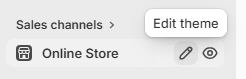
This will take you to the design area to customize your site experience. In the top of the page there are options for setting the App Embeds. You will see the HawkSearch logo and app name there. When you turn on that option, the search experience will be replaced with HawkSearch.
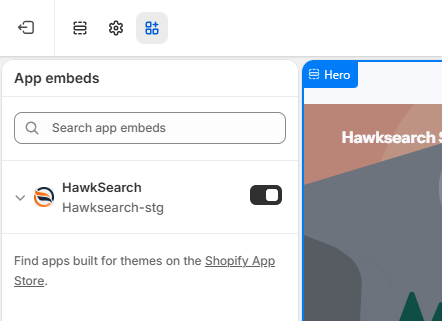
The changes will include:
- Search bar
- Autocomplete
- Search results
Standard Template Changes
If you want to change the style of the default template, this is done through standard CSS options in the template.
Building Your Own Search Experience
You don't have to use the search experience that comes with the app. Your developers, or the HawkSearch Services team, can build a custom search front end in your theme or a headless storefront, using Rapid UI, one of the HawkSearch SDKs, or the Search API.
The connector keeps doing the rest: syncing your fields, indexing products, real-time updates and billing.
If you build your own:
- Switch off the HawkSearch embed under App embeds in the theme editor, so the two search experiences don't conflict.
- Keep sending tracking events (search, clicks, add to cart, purchases). They power HawkSearch's analytics, recommendations and personalization. Either keep tracking switched on in the app, or send the same events from your search front end with the Event Tracking API.
- Searches from your own front end count toward your plan's search requests in the same way.
Updated 1 day ago