

Managing Facets
Managing Facets
API Docs
Detailed technical documentation is available here - Managing Facets API Documentation
Facet API Methods
Create a Facet
This API allows you to create a facet in the Hawksearch dashboard and manage the facet configurations.
Example use case: Create a Brand facet that can be used as a facet filter.
Request
| Endpoint | Method | Header Key |
|---|---|---|
| api/v11/Facet | POST | X-HawkSearch-ApiKey: {API key} |
REST reference: Add facet
Parameters
The request body is a Facet Object. See Facet Object section.
Examples
{
    "SyncGuid": "00000000-0000-0000-0000-000000000000",
    "FacetId": 0,
    "Name": "Brand",
    "FacetType": "checkbox",
    "FieldType": "string",
    "MaxCount": 0,
    "MinHitCount": 0,
    "Field": "brand",
    "Param": null,
    "DisplayType": "default",
    "ScrollHeight": 0,
    "ScrollThreshold": 0,
    "TruncateThreshold": 0,
    "SearchThreshold": 0,
    "SortOrder": 0,
    "ExpandSelection": false,
    "IsCurrency": false,
    "IsNumeric": false,
    "IsSearch": false,
    "IsVisible": true,
    "UBound": null,
    "LBound": null,
    "Increment": "0",
    "NofVisible": 0,
    "Height": 0,
    "DisplayRuleXML": null,
    "SortBy": "ScoreAndAlphaAndAlpha",
    "ParentId": 0,
    "IsCollapsible": true,
    "IsCollapsedDefault": false,
    "SwatchData": null,
    "FacetRangeDisplayType": 0,
    "PreloadChildren": false,
    "Tooltip": null,
    "ShowSliderInputs": false,
    "ShowFacetImageCount": false,
    "FacetRanges": [],
    "Tags": null,
    "CreateDate": "02-04-2020",
    "ModifyDate": "02-04-2020",
    "BoostBury": {
        "BoostValues": [],
        "BuryValues": []
    },
    "ListName": "Brand Facet",
    "NumericPrecision": 0,
    "CurrencySymbol": null
}
Response
The response is a Facet Object, a series of key-value pairs. See Facet Object section.
Examples
{
    "SyncGuid": "00000000-0000-0000-0000-000000000000",
    "FacetId": 171214,
    "Name": "Brand",
    "FacetType": "checkbox",
    "FieldType": "string",
    "MaxCount": 0,
    "MinHitCount": 0,
    "Field": "brand",
    "Param": null,
    "DisplayType": "default",
    "ScrollHeight": 0,
    "ScrollThreshold": 0,
    "TruncateThreshold": 0,
    "SearchThreshold": 0,
    "SortOrder": 0,
    "ExpandSelection": false,
    "IsCurrency": false,
    "IsNumeric": false,
    "IsSearch": false,
    "IsVisible": true,
    "UBound": null,
    "LBound": null,
    "Increment": "0",
    "NofVisible": 0,
    "Height": 0,
    "DisplayRuleXML": null,
    "SortBy": "ScoreAndAlphaAndAlpha",
    "ParentId": 0,
    "IsCollapsible": true,
    "IsCollapsedDefault": false,
    "SwatchData": null,
    "FacetRangeDisplayType": 0,
    "PreloadChildren": false,
    "Tooltip": null,
    "ShowSliderInputs": false,
    "ShowFacetImageCount": false,
    "FacetRanges": [],
    "Tags": null,
    "CreateDate": "02-04-2020",
    "ModifyDate": "02-04-2020",
    "BoostBury": {
        "BoostValues": [],
        "BuryValues": []
    },
    "ListName": "Brand Facet",
    "NumericPrecision": 0,
    "CurrencySymbol": null
}
Special Facet Considerations
Swatch facets: Facets defined as swatch need to have their swatches defined in the JSON format below.
"SwatchData": "[{\"Value\":\"White\",\"AssetName\":\"white2.png\",\"AssetUrl\":\"\",\"IsDefault\":true,\"Color\":null},
{\"Value\":\"empty\",\"AssetName\":\"emptySwatch.png\",\"AssetUrl\":null,\"IsDefault\":false,\"Color\":null},
{\"Value\":\"red\",\"AssetName\":\"reg.jpg\",\"AssetUrl\":null,\"IsDefault\":false,\"Color\":null},
{\"Value\":\"green\",\"AssetName\":\"green.jpg\",\"AssetUrl\":null,\"IsDefault\":false,\"Color\":null},
{\"Value\":\"brown\",\"AssetName\":\"brown.jpg\",\"AssetUrl\":null,\"IsDefault\":false,\"Color\":null},
{\"Value\":\"black\",\"AssetName\":\"black.jpg\",\"AssetUrl\":null,\"IsDefault\":false,\"Color\":null},
{\"Value\":\"Blue\",\"AssetName\":\"blue.jpg\",\"AssetUrl\":null,\"IsDefault\":false,\"Color\":null},
{\"Value\":\"Navy\",\"AssetName\":\"navy.jpg\",\"AssetUrl\":null,\"IsDefault\":false,\"Color\":null},
{\"Value\":\"Yellow\",\"AssetName\":\"yellow.jpg\",\"AssetUrl\":null,\"IsDefault\":false,\"Color\":null},
{\"Value\":\"Purple\",\"AssetName\":\"purple.png\",\"AssetUrl\":null,\"IsDefault\":false,\"Color\":null},
{\"Value\":\"Grey\",\"AssetName\":\"grey.jpg\",\"AssetUrl\":null,\"IsDefault\":false,\"Color\":null}]"
Display Rule: This is defined by XML as below. It is advised to create a facet with a display rule on the dashboard to better understand the format. See DisplayRuleXML Reference section.
"DisplayRuleXML": "<?xml version=\"1.0\" encoding=\"utf-16\"?>\r\n
<Rule xmlns:xsd=\"http://www.w3.org/2001/XMLSchema\" xmlns:xsi=\"http://www.w3.org/2001/XMLSchema-instance\" Operator=\"Any\" RuleType=\"Group\">\r\n
<Rules>\r\n    <Rule Operator=\"None\" RuleType=\"Eval\">\r\n
 <Field>landingpage:landingpage</Field>\r\n
 <Condition>is</Condition>\r\n
 <Value>4147787</Value>\r\n
 </Rule>\r\n
 </Rules>\r\n
 <Field />\r\n
 <Condition />\r\n
 <Value />\r\n
 </Rule>"
Boost and Bury: These are defined as arrays of objects with the following properties.
"BoostBury": {
    "BoostValues": [
        {
            "Value": "Patagonia",
            "SortOrder": 0
        },
        {
            "Value": "The North Face",
            "SortOrder": 1
        },
        {
            "Value": "Columbia Sportswear",
            "SortOrder": 2
        },
        {
            "Value": "Adventure Medical Kits",
            "SortOrder": 3
        }
    ],
    "BuryValues": [
        {
            "Value": "Jet Boil",
            "SortOrder": 1
        }
    ]
}
Facet Ranges: Facets defined as ranges can have minimum and maximum values defined by the LBound and UBound attributes under the FacetRanges object.
"FacetRanges": [
    {
        "RangeId": 69300,
        "Name": "Label 1",
        "LBound": "1",
        "UBound": "10",
        "SortOrder": 1,
        "AssetName": "",
        "AssetUrl": ""
    },
    {
        "RangeId": 69301,
        "Name": "Label 2",
        "LBound": "11",
        "UBound": "20",
        "SortOrder": 2,
        "AssetName": "",
        "AssetUrl": ""
    }
]
Best Practices
This section covers some basic questions to consider when adding a new facet via the API.
REST reference: Add facet
Method: POST
Authentication: Basic (Engine API Key)
-
Please make sure that the field for the facet filter is already created, otherwise you will receive an error like the one below.

-
When creating a new facet, you need to make sure that the following attributes are always sent in the request payload, otherwise the request would be invalid.
{ "Name": "Age", "FacetType": "checkbox", "FieldType": "string", "MaxCount": 20, "MinHitCount": 1, "Field": "age", "DisplayType": "scrolling", "ScrollHeight": 150, "ScrollThreshold": 10, "TruncateThreshold": 0, "SearchThreshold": 0, "SortOrder": 22, "ExpandSelection": true, "IsCurrency": false, "IsNumeric": false, "IsSearch": false, "IsVisible": true, "IsCollapsible": true, "IsCollapsedDefault": false, "ShowSliderInputs": true } -
Please make sure to create one facet for each field. If you try to create multiple facets using the same field name then you will get a notification like the one below.

-
How to utilize FieldType and FacetType in association with each other?
When adding a facet field type, you can only add the facet types valid for that specific field.
Facet Field Type Facet Type String checkbox (Checkbox List), link (Link List), nestedcheckbox (Nested Checkbox), nestedlinklist (Nested Link List), size (Size), swatch (Swatch), rating (Rating) Search related (Related Searches), recentsearches (Recent Searches), search (Search Within) Range checkbox (Checkbox List), link (Link List), slider (Slider) Numeric checkbox (Checkbox List), link (Link List), nestedcheckbox (Nested Checkbox), nestedlinklist (Nested Link List), size (Size), swatch (Swatch), rating (Rating) Valid Request:
{
    "Name": "Age",
    "FacetType": "checkbox",
    "FieldType": "string",
    "MaxCount": 20,
    "MinHitCount": 1,
    "Field": "age",
    "DisplayType": "scrolling",
    "ScrollHeight": 150,
    "ScrollThreshold": 10,
    "TruncateThreshold": 0,
    "SearchThreshold": 0,
    "SortOrder": 22,
    "ExpandSelection": true,
    "IsCurrency": false,
    "IsNumeric": false,
    "IsSearch": false,
    "IsVisible": true,
    "IsCollapsible": true,
    "IsCollapsedDefault": false,
    "ShowSliderInputs": true
}
Invalid Request: FacetType 'checkbox' cannot be used with FieldType 'search'.
{ "Name": "Age", "FacetType": "checkbox", "FieldType": "search", "MaxCount": 20, "MinHitCount": 1, "Field": "age", "DisplayType": "scrolling", "ScrollHeight": 150, "ScrollThreshold": 10, "TruncateThreshold": 0, "SearchThreshold": 0, "SortOrder": 22, "ExpandSelection": true, "IsCurrency": false, "IsNumeric": false, "IsSearch": false, "IsVisible": true, "IsCollapsible": true, "IsCollapsedDefault": false, "ShowSliderInputs": true } -
There are 3 options available for DisplayType:
- If "DisplayType": "scrolling", please set up the 'ScrollHeight' and 'ScrollThreshold' attributes. By default ScrollHeight = 150 and ScrollThreshold = 10. TruncateThreshold needs to be set to 0 when DisplayType = scrolling.
- If "DisplayType": "truncating", ScrollHeight and ScrollThreshold need to be set to 0. Please set up 'TruncateThreshold' for this display type, which is a numeric value N indicating the first N values that should show up in the facet.
- If "DisplayType": "default", 'TruncateThreshold', 'ScrollHeight' and 'ScrollThreshold' need to be set to 0.
-
'Is Search Enabled?' and 'Search Threshold'. The 'IsSearch' attribute makes the facet searchable for its filters. This is useful for facets containing more than 15 values. If IsSearch is set to true, then you can specify the minimum number of filters to be present in the facet to make it searchable by using the SearchThreshold attribute. SearchThreshold should have a numeric value.
-
Range facet versus Checkbox list facet for numeric fields. The default display type option is the checkbox list for a given facet. This displays all the values available corresponding to its mapped field and the resulting items.
For a facet mapped to a numeric field, this display type is usually not ideal if the field has a high number of decimal values that are different for every product; the checkbox facet corresponding to this will be huge, with one product per facet value as below:
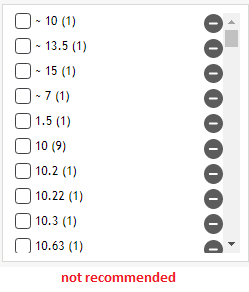
In the above case, users are forced to search for the exact value, and the UI also isn't appealing. This also adds to performance issues due to the aggregations required to pull every facet value.
Instead, we can change the display type to a range slider facet:
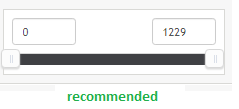
This is an elegant, simple and user-friendly approach to display a numeric field's facet. The user can also enter the desired value to filter by, and this has better performance.
Update a Facet
This API allows you to update a facet in the Hawksearch dashboard and manage the facet configurations.
Example use case: Update a Brand facet name.
Request
| Endpoint | Method | Header Key |
|---|---|---|
| api/v11/Facet/{FacetId} | PUT | X-HawkSearch-ApiKey: {API key} |
REST reference: Update facet by id
Parameters
The request body is a Facet Object. See Facet Object section.
Examples
{
    "SyncGuid": "00000000-0000-0000-0000-000000000000",
    "FacetId": 171214,
    "Name": "Brand Update Name",
    "FacetType": "checkbox",
    "FieldType": "string",
    "MaxCount": 0,
    "MinHitCount": 0,
    "Field": "brand",
    "Param": null,
    "DisplayType": "default",
    "ScrollHeight": 0,
    "ScrollThreshold": 0,
    "TruncateThreshold": 0,
    "SearchThreshold": 0,
    "SortOrder": 5,
    "ExpandSelection": false,
    "IsCurrency": false,
    "IsNumeric": false,
    "IsSearch": false,
    "IsVisible": true,
    "UBound": null,
    "LBound": null,
    "Increment": "0",
    "NofVisible": 0,
    "Height": 0,
    "DisplayRuleXML": null,
    "SortBy": "ScoreAndAlphaAndAlpha",
    "ParentId": 0,
    "IsCollapsible": true,
    "IsCollapsedDefault": false,
    "SwatchData": null,
    "FacetRangeDisplayType": 0,
    "PreloadChildren": false,
    "Tooltip": null,
    "ShowSliderInputs": false,
    "ShowFacetImageCount": false,
    "FacetRanges": [],
    "Tags": null,
    "CreateDate": "03-08-2021",
    "ModifyDate": "03-08-2021",
    "BoostBury": {
        "BoostValues": [],
        "BuryValues": []
    },
    "ListName": "Brand Facet",
    "NumericPrecision": 0,
    "CurrencySymbol": null
}
Response
The response is a Facet Object, a series of key-value pairs. See Facet Object section.
Examples
{
    "SyncGuid": "00000000-0000-0000-0000-000000000000",
    "FacetId": 171214,
    "Name": "Brand Update Name",
    "FacetType": "checkbox",
    "FieldType": "string",
    "MaxCount": 0,
    "MinHitCount": 0,
    "Field": "brand",
    "Param": null,
    "DisplayType": "default",
    "ScrollHeight": 0,
    "ScrollThreshold": 0,
    "TruncateThreshold": 0,
    "SearchThreshold": 0,
    "SortOrder": 5,
    "ExpandSelection": false,
    "IsCurrency": false,
    "IsNumeric": false,
    "IsSearch": false,
    "IsVisible": true,
    "UBound": null,
    "LBound": null,
    "Increment": "0",
    "NofVisible": 0,
    "Height": 0,
    "DisplayRuleXML": null,
    "SortBy": "ScoreAndAlphaAndAlpha",
    "ParentId": 0,
    "IsCollapsible": true,
    "IsCollapsedDefault": false,
    "SwatchData": null,
    "FacetRangeDisplayType": 0,
    "PreloadChildren": false,
    "Tooltip": null,
    "ShowSliderInputs": false,
    "ShowFacetImageCount": false,
    "FacetRanges": [],
    "Tags": null,
    "CreateDate": "03-08-2021",
    "ModifyDate": "03-08-2021",
    "BoostBury": {
        "BoostValues": [],
        "BuryValues": []
    },
    "ListName": "Brand Facet",
    "NumericPrecision": 0,
    "CurrencySymbol": null
}
Add a Display Rule to a Facet
This API allows you to update a facet in the Hawksearch dashboard to add a display rule. It uses the same PUT endpoint as Update a Facet.
Example use case: Add a display rule for the Price facet so that it is only visible when Brand is 'Columbia Sportswear'.
Note
Please pass the FacetId in the PUT request below.
Request
| Endpoint | Method | Header Key |
|---|---|---|
| api/v11/Facet/{FacetId} | PUT | X-HawkSearch-ApiKey: {API key} |
REST reference: Update facet by id
Parameters
The request body is a Facet Object with the DisplayRuleXML property populated. See Facet Object section. For the rule format, see DisplayRuleXML Reference section.
Examples
{
    "SyncGuid": "00000000-0000-0000-0000-000000000000",
    "FacetId": 83284,
    "Name": "Price",
    "FacetType": "checkbox",
    "FieldType": "numeric",
    "MaxCount": 30,
    "MinHitCount": 1,
    "Field": "price",
    "Param": "",
    "DisplayType": "default",
    "ScrollHeight": 0,
    "ScrollThreshold": 0,
    "TruncateThreshold": 0,
    "SearchThreshold": 0,
    "SortOrder": 20932,
    "ExpandSelection": false,
    "IsCurrency": true,
    "IsNumeric": true,
    "IsSearch": false,
    "IsVisible": true,
    "UBound": null,
    "LBound": null,
    "Increment": "0",
    "NofVisible": 10,
    "Height": 0,
    "DisplayRuleXML": "<?xml version=\"1.0\" encoding=\"utf-16\"?>\r\n<Rule xmlns:xsd=\"http://www.w3.org/2001/XMLSchema\" xmlns:xsi=\"http://www.w3.org/2001/XMLSchema-instance\" Operator=\"Any\" RuleType=\"Group\">\r\n  <Rules>\r\n    <Rule Operator=\"None\" RuleType=\"Eval\">\r\n      <Rules />\r\n      <Field>facet:brand</Field>\r\n      <Condition>is</Condition>\r\n      <Value>Columbia Sportswear</Value>\r\n    </Rule>\r\n  </Rules>\r\n  <Field />\r\n  <Condition />\r\n  <Value />\r\n</Rule>",
    "SortBy": "Ascending",
    "ParentId": 0,
    "IsCollapsible": true,
    "IsCollapsedDefault": false,
    "SwatchData": null,
    "FacetRangeDisplayType": 0,
    "PreloadChildren": false,
    "Tooltip": "Price",
    "ShowSliderInputs": true,
    "ShowFacetImageCount": true,
    "FacetRanges": [
        {
            "RangeId": 72624,
            "Name": "$0 - $150.99\t",
            "LBound": "0",
            "UBound": "150.99",
            "SortOrder": 1,
            "AssetName": "",
            "AssetUrl": ""
        },
        {
            "RangeId": 72625,
            "Name": "$151 - $200.99",
            "LBound": "151",
            "UBound": "200.99",
            "SortOrder": 2,
            "AssetName": "",
            "AssetUrl": ""
        },
        {
            "RangeId": 72626,
            "Name": "$201 - $500",
            "LBound": "201",
            "UBound": "500",
            "SortOrder": 3,
            "AssetName": "",
            "AssetUrl": ""
        },
        {
            "RangeId": 72627,
            "Name": "$501 - $750",
            "LBound": "501",
            "UBound": "750",
            "SortOrder": 4,
            "AssetName": "",
            "AssetUrl": ""
        },
        {
            "RangeId": 72628,
            "Name": "$751 - $1000",
            "LBound": "751",
            "UBound": "1000",
            "SortOrder": 5,
            "AssetName": "",
            "AssetUrl": ""
        },
        {
            "RangeId": 72629,
            "Name": "$1000 - $2000",
            "LBound": "1000",
            "UBound": "2000",
            "SortOrder": 6,
            "AssetName": "",
            "AssetUrl": ""
        },
        {
            "RangeId": 72630,
            "Name": "$2000 - $3000",
            "LBound": "2000",
            "UBound": "3000",
            "SortOrder": 7,
            "AssetName": "",
            "AssetUrl": ""
        },
        {
            "RangeId": 72631,
            "Name": "$3000 and Up",
            "LBound": "3000",
            "UBound": "999999999",
            "SortOrder": 8,
            "AssetName": "",
            "AssetUrl": ""
        }
    ],
    "Tags": "",
    "CreateDate": "01-01-0001",
    "ModifyDate": "04-12-2021",
    "BoostBury": {
        "BoostValues": [],
        "BuryValues": []
    },
    "ListName": "Price",
    "NumericPrecision": 0,
    "CurrencySymbol": null
}
Response
The response is a Facet Object, a series of key-value pairs. See Facet Object section.
Examples
{
    "SyncGuid": "00000000-0000-0000-0000-000000000000",
    "FacetId": 83284,
    "Name": "Price",
    "FacetType": "checkbox",
    "FieldType": "numeric",
    "MaxCount": 30,
    "MinHitCount": 1,
    "Field": "price",
    "Param": "",
    "DisplayType": "default",
    "ScrollHeight": 0,
    "ScrollThreshold": 0,
    "TruncateThreshold": 0,
    "SearchThreshold": 0,
    "SortOrder": 20932,
    "ExpandSelection": false,
    "IsCurrency": true,
    "IsNumeric": true,
    "IsSearch": false,
    "IsVisible": true,
    "UBound": null,
    "LBound": null,
    "Increment": "0",
    "NofVisible": 10,
    "Height": 0,
    "DisplayRuleXML": "<?xml version=\"1.0\" encoding=\"utf-16\"?>\r\n<Rule xmlns:xsd=\"http://www.w3.org/2001/XMLSchema\" xmlns:xsi=\"http://www.w3.org/2001/XMLSchema-instance\" Operator=\"Any\" RuleType=\"Group\">\r\n  <Rules>\r\n    <Rule Operator=\"None\" RuleType=\"Eval\">\r\n     <Field>facet:brand</Field>\r\n      <Condition>is</Condition>\r\n      <Value>Columbia Sportswear</Value>\r\n    </Rule>\r\n  </Rules>\r\n</Rule>",
    "SortBy": "Ascending",
    "ParentId": 0,
    "IsCollapsible": true,
    "IsCollapsedDefault": false,
    "SwatchData": null,
    "FacetRangeDisplayType": 0,
    "PreloadChildren": false,
    "Tooltip": "Price",
    "ShowSliderInputs": true,
    "ShowFacetImageCount": true,
    "FacetRanges": [
        {
            "RangeId": 1,
            "Name": "$0 - $150.99\t",
            "LBound": "0",
            "UBound": "150.99",
            "SortOrder": 1,
            "AssetName": "",
            "AssetUrl": ""
        },
        {
            "RangeId": 2,
            "Name": "$151 - $200.99",
            "LBound": "151",
            "UBound": "200.99",
            "SortOrder": 2,
            "AssetName": "",
            "AssetUrl": ""
        },
        {
            "RangeId": 3,
            "Name": "$201 - $500",
            "LBound": "201",
            "UBound": "500",
            "SortOrder": 3,
            "AssetName": "",
            "AssetUrl": ""
        },
        {
            "RangeId": 4,
            "Name": "$501 - $750",
            "LBound": "501",
            "UBound": "750",
            "SortOrder": 4,
            "AssetName": "",
            "AssetUrl": ""
        },
        {
            "RangeId": 5,
            "Name": "$751 - $1000",
            "LBound": "751",
            "UBound": "1000",
            "SortOrder": 5,
            "AssetName": "",
            "AssetUrl": ""
        },
        {
            "RangeId": 6,
            "Name": "$1000 - $2000",
            "LBound": "1000",
            "UBound": "2000",
            "SortOrder": 6,
            "AssetName": "",
            "AssetUrl": ""
        },
        {
            "RangeId": 7,
            "Name": "$2000 - $3000",
            "LBound": "2000",
            "UBound": "3000",
            "SortOrder": 7,
            "AssetName": "",
            "AssetUrl": ""
        },
        {
            "RangeId": 8,
            "Name": "$3000 and Up",
            "LBound": "3000",
            "UBound": "999999999",
            "SortOrder": 8,
            "AssetName": "",
            "AssetUrl": ""
        }
    ],
    "Tags": "",
    "CreateDate": "01-01-0001",
    "ModifyDate": "04-12-2021",
    "BoostBury": {
        "BoostValues": [],
        "BuryValues": []
    },
    "ListName": "Price",
    "NumericPrecision": 0,
    "CurrencySymbol": null
}
Delete a Facet
This API allows you to delete a facet from the Hawksearch dashboard Facets section.
Example use case: Delete a Brand facet.
Request
Pass the FacetId of the facet you want to delete in the API request.
| Endpoint | Method | Header Key |
|---|---|---|
| api/v11/Facet/{FacetId} | DELETE | X-HawkSearch-ApiKey: {API key} |
REST reference: Delete facet by id
Response
The response is the deleted Facet Object, a series of key-value pairs. See Facet Object section.
Examples
{
    "SyncGuid": "00000000-0000-0000-0000-000000000000",
    "FacetId": 171214,
    "Name": "Brand",
    "FacetType": "checkbox",
    "FieldType": "string",
    "MaxCount": 0,
    "MinHitCount": 0,
    "Field": "brand",
    "Param": null,
    "DisplayType": "default",
    "ScrollHeight": 0,
    "ScrollThreshold": 0,
    "TruncateThreshold": 0,
    "SearchThreshold": 0,
    "SortOrder": 5,
    "ExpandSelection": false,
    "IsCurrency": false,
    "IsNumeric": false,
    "IsSearch": false,
    "IsVisible": true,
    "UBound": null,
    "LBound": null,
    "Increment": "0",
    "NofVisible": 0,
    "Height": 0,
    "DisplayRuleXML": null,
    "SortBy": "ScoreAndAlphaAndAlpha",
    "ParentId": 0,
    "IsCollapsible": true,
    "IsCollapsedDefault": false,
    "SwatchData": null,
    "FacetRangeDisplayType": 0,
    "PreloadChildren": false,
    "Tooltip": null,
    "ShowSliderInputs": false,
    "ShowFacetImageCount": false,
    "FacetRanges": [],
    "Tags": null,
    "CreateDate": "03-08-2021",
    "ModifyDate": "03-08-2021",
    "BoostBury": {
        "BoostValues": [],
        "BuryValues": []
    },
    "ListName": "Brand Facet",
    "NumericPrecision": 0,
    "CurrencySymbol": null
}
Objects
Facet Object
The Facet Object is returned in the Create, Update, Add a Display Rule, and Delete a Facet methods. Each facet object is a series of key-value pairs.
Description
| No | Key | Description | Value Type |
|---|---|---|---|
| 1 | FacetId | The unique identifier of the facet (unique across the whole system) | Number |
| 2 | SyncGuid | Internal field | GUID |
| 3 | Name | This is the name of the facet displayed to the user on the search results page. This property corresponds to the display name of the facet in the workbench. | Alphanumeric string |
| 4 | FacetType | Indicates the mode in which the facet is displayed and is configurable from the workbench. Possible values: checkbox (Checkbox List) link (Link List) nestedcheckbox (Nested Checkbox) nestedlinklist (Nested Link List) size (Size) swatch (Swatch) rating (Rating) slider (Slider) related (Related Searches) recentsearches (Recent Searches) search (Search Within) | One of the possible values: checkbox (String, Numeric, Range, Tabs) link (String, Numeric, Range, Tabs) nestedcheckbox (String, Numeric, Tabs) nestedlinklist (String, Numeric, Tabs) size (String, Numeric, Tabs) swatch (String, Numeric, Tabs) rating (String, Numeric, Tabs) slider (Numeric, Range) related (Search) recentsearches (Search) search (Search) |
| 5 | FieldType | Datatype of the field | One of the possible values: Single Numeric String Search |
| 6 | MaxCount | The integer value which indicates the maximum number of facet values which can be displayed inside the facet. As of the Hermes release, setting the value of MaxCount to 0 is not acceptable by default, to prevent potential performance issues. | Numeric |
| 7 | MinHitCount | The integer value which indicates the minimum count of filters the facet must possess in order to be displayed as an option. | Numeric |
| 8 | Field | The name of the field for the facet. | lowercase alphanumeric string with underscores allowed |
| 9 | Param | This is the parameter to be used if you need to apply a filter using this facet. Example: to filter by the brand 'The North Face', send the parameter 'brand=The North Face' in addition to the other filters. | Alphanumeric |
| 10 | DisplayType | This property provides options to fine-tune the way the list of facet values is displayed. In the JSON output, the three choices (defined in lowercase) are: scrolling default truncating | String |
| 11 | ScrollHeight | This is used when the facet's DisplayType is set to scroll. It sets the height of the facet in pixels. | Numeric |
| 12 | ScrollThreshold | This is used when the facet's DisplayType is set to scroll. It sets the minimum limit for the number of filters to be present in the facet for it to be displayed in a scrolling manner. | Numeric |
| 13 | TruncateThreshold | This is used when the facet's DisplayType is set to Truncating. The truncated facet shows only the first N values, where N is the number set in the workbench; to load more values, the user clicks the 'show more' link. | Numeric |
| 14 | SearchThreshold | It specifies the minimum number of filters to be present in the facet to make it searchable. The facet needs to have 'Is Search Enabled?' set to on (i.e. the IsSearch property needs to be true). | Numeric |
| 15 | IsCurrency | Indicates if the facet needs to display the currency symbol. If the facet's FieldType is set as either numeric or range and the display type is slider, then this option is displayed. | Boolean |
| 16 | IsNumeric | Indicator for range type of facets to show the slider. This property is hidden for all other facet types. | Boolean |
| 17 | IsSearch | This makes the facet searchable for its filters. This is useful for facets containing more than 15 values in general. | Boolean |
| 18 | IsVisible | Boolean switch to toggle the visibility of the facet | Boolean |
| 19 | UBound | Indicates the upper bound of the range facet. | Numeric |
| 20 | LBound | Indicates the lower bound of the range facet. | Numeric |
| 21 | Increment | Setting up the range facet slider value | Numeric |
| 22 | NofVisible | Number of visible facet values | Numeric |
| 23 | Height | Height of the scrollable facet values | Numeric |
| 24 | DisplayRuleXML | Display rule details of the facet in XML format | XML |
| 25 | SortBy | Indicates the default sort order of the facet. | Numeric |
| 26 | ParentId | ParentId of the facet for hierarchical facets. | Numeric |
| 27 | IsCollapsible | Boolean value indicating whether the facet can be completely collapsed into a header | Boolean |
| 28 | IsCollapsedDefault | Boolean value indicating collapsible display | Boolean |
| 29 | SwatchData | A special type of facet is a swatch, which displays images instead of the facet filters. The JSON output consists of the list of images. This is most useful for colors. | Alphanumeric |
| 30 | FacetRangeDisplayType | Numeric value to indicate the sub type of the facet when it is a range. | Numeric |
| 31 | PreloadChildren | Nested facets can load children filters either upon click event of the parent filter or automatically. This choice can be opted based on the value of this property. | Boolean |
| 32 | Tooltip | Quick help for the user, available when hovered over the question mark next to the facet name | Alphanumeric |
| 33 | ShowSliderInputs | For slider facets, the user-entered inputs can be made visible using this property. | Boolean |
| 34 | ShowFacetImageCount | Boolean value to show or hide facet image count | Boolean |
| 35 | FacetRanges | Consists of FacetRangeModel objects. | FacetRangeModel Object |
| 36 | Tags | Tags associated with a facet | Alphanumeric |
| 37 | CreateDate | Facet creation date | Date string in MM-DD-YYYY format |
| 38 | ModifyDate | Facet modification date | Date string in MM-DD-YYYY format |
| 39 | BoostValues | Boost value of a facet | Numeric |
| 40 | BuryValues | Bury value of a facet | Numeric |
| 41 | ListName | Name of the facet which is not displayed to front-end users. | Alphanumeric |
| 42 | NumericPrecision | Optional configuration for numeric facets indicating how many decimal places should be displayed for the facet's numeric values. | Numeric |
| 43 | CurrencySymbol | Used if the facet type uses currency. | Alphanumeric |
| 44 | ExpandSelection | This field controls whether your customer will see additional filters after making their initial selection. All relevant sub-departments will still be returned, but other filters not related to the initial selection will be hidden if this option is set to No. If set to Yes, the top-level filters and each layer of additional sub-departments will be displayed. This is helpful if you have a department with hundreds of sub-departments, for example, so you can limit the number of filters customers view and avoid overwhelming them. | Boolean |
DisplayRuleXML Reference
The DisplayRuleXML property of a Facet Object defines display rules in XML. If the condition set for selecting products is not linear and requires multiple clauses that cannot be accommodated by the attribute_name or attribute_value structure, specify the entire XML for the rule.
Representation Example
<?xml version="1.0" encoding="UTF-8"?>
<Rule xmlns:xsd="https://www.w3.org/2001/XMLSchema" xmlns:xsi="http://www.w3.org/2001/XMLSchema-instance" RuleType="Group" Operator="All">
   <Rules>
      <Rule RuleType="Eval" Operator="None">
         <Field>facet:brand</Field>
         <Condition>is</Condition>
         <Value>Columbia Sportswear</Value>
      </Rule>
      <Rule RuleType="Eval" Operator="None">
         <Field>facet:subdepartment</Field>
         <Condition>is</Condition>
         <Value>Socks</Value>
      </Rule>
      <Rule RuleType="Eval" Operator="None">
         <Field>keyword:Keyword</Field>
         <Condition>contains</Condition>
         <Value>sock</Value>
      </Rule>
   </Rules>
</Rule>
Rules Node
Attributes:
- RuleType specifies whether the rule must be processed for a result or treated as a group with rules nested inside it. If the rules node contains further rules, the type must be set to "Group" for that rules node. For rules that need to be evaluated, set this attribute to "Eval".
- Operator specifies the condition for evaluating rules within a group. If all rules in the group need to be met to satisfy the group, the value must be set to "All". If at least one rule needs to be satisfied, set the value to "Any". For nested rules (not the parent rules node), if there is only one rule inside the group, set the value to "None".
Child Nodes:
- Field: Specify the field name you want to use as part of the condition.
- Condition: Specify the condition (is equal to, contains, and so on).
- Value: This is the value to compare against.
e: Create a Brand facet that can be used as a facet filter.
Request: POST request to the API below:
    {
        "SyncGuid": "00000000-0000-0000-0000-000000000000",
        "FacetId": 0,
        "Name": "Brand",
        "FacetType": "checkbox",
        "FieldType": "string",
        "MaxCount": 0,
        "MinHitCount": 0,
        "Field": "brand",
        "Param": null,
        "DisplayType": "default",
        "ScrollHeight": 0,
        "ScrollThreshold": 0,
        "TruncateThreshold": 0,
        "SearchThreshold": 0,
        "SortOrder": 0,
        "ExpandSelection": false,
        "IsCurrency": false,
        "IsNumeric": false,
        "IsSearch": false,
        "IsVisible": true,
        "UBound": null,
        "LBound": null,
        "Increment": "0",
        "NofVisible": 0,
        "Height": 0,
        "DisplayRuleXML": null,
        "SortBy": "ScoreAndAlphaAndAlpha",
        "ParentId": 0,
        "IsCollapsible": true,
        "IsCollapsedDefault": false,
        "SwatchData": null,
        "FacetRangeDisplayType": 0,
        "PreloadChildren": false,
        "Tooltip": null,
        "ShowSliderInputs": false,
        "ShowFacetImageCount": false,
        "FacetRanges": [],
        "Tags": null,
        "CreateDate": "02-04-2020",
        "ModifyDate": "02-04-2020",
        "BoostBury": {
            "BoostValues": [],
            "BuryValues": []
        },
        "ListName": "Brand Facet",
        "NumericPrecision": 0,
        "CurrencySymbol": null
    }
Response: The response is an array of facet objects, every facet object being a series of key-value pairs. Description of the data is as follows:
| No | Key | Description | Value Type |
|---|---|---|---|
| No | Key | Description | Value Type |
| 1 | FacetId | The unique identifier of the facet (unique across the whole system) | Number |
| 2 | SyncGuid | Internal field | GUID |
| 3 | Name | This is the name of the facet displayed to the user on the search results page. This property corresponds to the display name of the facet in the workbench. | Alphanumeric string |
| 4 | FacetType | Indicates the mode in which the facet is displayed and configurable from the workbench. Possible values for this are:checkbox (Checkbox List)link (Link List)nestedcheckbox (Nested Checkbox)nestedlinklist (Nested Link List)size (Size)swatch (Swatch)rating (Rating)slider (Slider)related (Related Searches)recentsearches (Recent Searches)search (Search Within) | One of the possible values - checkbox (String, Numeric, Range, Tabs)link (String, Numeric, Range, Tabs)nestedcheckbox (String, Numeric, Tabs)nestedlinklist (String, Numeric, Tabs)size (String, Numeric, Tabs)swatch (String, Numeric, Tabs)rating (String, Numeric, Tabs)slider (Numeric, Range)related (Search)recentsearches (Search)search (Search) |
| 5 | FieldType | Datatype of the field | One of the 3 possible values - SingleNumericStringSearch |
| 6 | MaxCount | The integer value which indicates the maximum number of facet values which can be displayed inside the facet. As of the Hermes release, setting the value of MaxCount to 0 is not acceptable by default to prevent potential performance issues. | Numeric |
| 7 | MinHitCount | The integer value which indicates the minimum number of facet values the minimum count of filters the facet must possess in order to be displayed as an option. | Numeric |
| 8 | Field | The name of the field for the facet. | lowercase alphanumeric string with underscores allowed |
| 9 | Param | This is the parameter to be used if you need to apply filter using this facet. Example, if you need to filter by the brand "The North Face"" then in send the parameter ""brand=The North Face"" in addition to the other filters." | Alphanumeric |
| 10 | DisplayType | This is the property which provides options to fine-tune the way the list of facet values will be displayed. In the JSON output, the three different choices that will determine what fields will need to be defined in lowercase:scrollingdefaulttruncating | String |
| 11 | ScrollHeight | This is used when the facet's DisplayType is set to scroll. It sets the height of the facet in pixels. | Numeric |
| 12 | ScrollThreshold | This is used when the facet's DisplayType is set to scroll. It sets the minimum limit for the number of filters to be present in the facet for it to be displayed in a scrolling manner. | Numeric |
| 13 | TruncateThreshold | This is used when the facet's DisplayType is set to Truncating.The truncated facet shows only the first N values where N is the number set in the workbench, to load more values, user needs to click the "show more"" link." | Numeric |
| 14 | SearchThreshold | It specifies the minimum number of filters to be present in the facet to make it search-able. The facet needs to have "Is Search Enabled?"" set to on | in other words IsSearch property needs to be true." |
| 15 | IsCurrency | Indicates if the facet needs to display the currency symbol. If the facet's FieldType is set as either numeric or range, and the display type is slider, then this option is displayed. | Boolean |
| 16 | IsNumeric | Indicator for range type of facets to show the slider. This property is hidden for all other facet types. | Boolean |
| 17 | IsSearch | This makes the facet searchable for its filters. This is useful for facets containing more than 15 values in general. | Boolean |
| 18 | IsVisible | Boolean switch to toggle the visibility of the facet | Boolean |
| 19 | UBound | Indicates the upper bound of the range facet. | Numeric |
| 20 | LBound | Indicates the lower bound of the range facet. | Numeric |
| 21 | Increment | Setting up the range facet slider value | Numeric |
| 22 | NofVisible | Number of Visible Facet values | Numeric |
| 23 | Height | Height of the scrollable facet values | Numeric |
| 24 | DisplayRuleXML | Display rule details of the facet in XML format | XML |
| 25 | SortBy | Indicates the default sort order of the facet. | Numeric |
| 26 | ParentId | ParentId of the facet for Hierarchial facets. | Numeric |
| 27 | IsCollapsible | Boolean value indicating whether the facet can be completely collapsed into a header | Boolean |
| 28 | IsCollapsedDefault | Boolean value indicating collapsible display | Boolean |
| 29 | SwatchData | A special type of facet is a swatch which displays images instead of the facet filters. The JSON output consists of the list of images. This is most useful for colors. | Alphanumeric |
| 30 | FacetRangeDisplayType | Numeric value to indicate the sub type of the facet when it is a range. | Numeric |
| 31 | PreloadChildren | Nested facets can load children filters either upon click event of the parent filter or automatically. This choice can be opted based on the value of this property. | Boolean |
| 32 | Tooltip | Quick help for the user available when hovered over the question mark next to the facet name | Alphanumeric |
| 33 | ShowSliderInputs | For slider facet, the user-entered inputs can be made visible using this property. | Boolean |
| 34 | ShowFacetImageCount | Boolean value to show or hide facet image count | Boolean |
| 35 | FacetRanges | It consistes of FacetRangeModel object. | FacetRangeModel Object |
| 36 | Tags | Tags assocaited with a facet | Alphanumeric |
| 37 | CreateDate | Facet Creation Date | Date string in MM-DD-YYYY format |
| 38 | ModifyDate | Facet Modification Date | Date string in MM-DD-YYYY format |
| 39 | BoostValues | Boost value of a facet | Numeric |
| 40 | BuryValues | Bury value of a facet | Numeric |
| 41 | ListName | Name of the facet which is not displayed to front end users. | Alphanumeric |
| 42 | NumericPrecision | Numeric | Numeric |
| 43 | CurrencySymbol | If facet type uses Currency | Alphanumeric |
| 44 | ExpandSelection | This field controls whether or not you will allow your customer to see additional filters after making their initial selection. All relevant sub departments will still be returned, but other filters not related to the initial selection will be hidden if this option is set to NO. If the option is set to YES, then the top level filters, and each layer of additional sub-departments, will be displayed. This is helpful if you have a department that has hundreds of sub-departments, for example. You can limit the number of filters that your customers can view so as not to overwhelm them. | Boolean |
{
    "SyncGuid": "00000000-0000-0000-0000-000000000000",
    "FacetId": 171214,
    "Name": "Brand",
    "FacetType": "checkbox",
    "FieldType": "string",
    "MaxCount": 0,
    "MinHitCount": 0,
    "Field": "brand",
    "Param": null,
    "DisplayType": "default",
    "ScrollHeight": 0,
    "ScrollThreshold": 0,
    "TruncateThreshold": 0,
    "SearchThreshold": 0,
    "SortOrder": 0,
    "ExpandSelection": false,
    "IsCurrency": false,
    "IsNumeric": false,
    "IsSearch": false,
    "IsVisible": true,
    "UBound": null,
    "LBound": null,
    "Increment": "0",
    "NofVisible": 0,
    "Height": 0,
    "DisplayRuleXML": null,
    "SortBy": "ScoreAndAlphaAndAlpha",
    "ParentId": 0,
    "IsCollapsible": true,
    "IsCollapsedDefault": false,
    "SwatchData": null,
    "FacetRangeDisplayType": 0,
    "PreloadChildren": false,
    "Tooltip": null,
    "ShowSliderInputs": false,
    "ShowFacetImageCount": false,
    "FacetRanges": [],
    "Tags": null,
    "CreateDate": "02-04-2020",
    "ModifyDate": "02-04-2020",
    "BoostBury": {
        "BoostValues": [],
        "BuryValues": []
    },
    "ListName": "Brand Facet",
    "NumericPrecision": 0,
    "CurrencySymbol": null
}
Special facets considerations:
Swatch facets : facets defined as swatch need to have their swatches defined in the below json format:
"SwatchData": "[{\"Value\":\"White\",\"AssetName\":\"white2.png\",\"AssetUrl\":\"\",\"IsDefault\":true,\"Color\":null},
{\"Value\":\"empty\",\"AssetName\":\"emptySwatch.png\",\"AssetUrl\":null,\"IsDefault\":false,\"Color\":null},
{\"Value\":\"red\",\"AssetName\":\"reg.jpg\",\"AssetUrl\":null,\"IsDefault\":false,\"Color\":null},
{\"Value\":\"green\",\"AssetName\":\"green.jpg\",\"AssetUrl\":null,\"IsDefault\":false,\"Color\":null},
{\"Value\":\"brown\",\"AssetName\":\"brown.jpg\",\"AssetUrl\":null,\"IsDefault\":false,\"Color\":null},
{\"Value\":\"black\",\"AssetName\":\"black.jpg\",\"AssetUrl\":null,\"IsDefault\":false,\"Color\":null},
{\"Value\":\"Blue\",\"AssetName\":\"blue.jpg\",\"AssetUrl\":null,\"IsDefault\":false,\"Color\":null},
{\"Value\":\"Navy\",\"AssetName\":\"navy.jpg\",\"AssetUrl\":null,\"IsDefault\":false,\"Color\":null},
{\"Value\":\"Yellow\",\"AssetName\":\"yellow.jpg\",\"AssetUrl\":null,\"IsDefault\":false,\"Color\":null},
{\"Value\":\"Purple\",\"AssetName\":\"purple.png\",\"AssetUrl\":null,\"IsDefault\":false,\"Color\":null},
{\"Value\":\"Grey\",\"AssetName\":\"grey.jpg\",\"AssetUrl\":null,\"IsDefault\":false,\"Color\":null}]"
Display Rule: this is defined by XML as below, it is advised to create a facet with a display rule on the dashboard to better understand the format:
"DisplayRuleXML": "<?xml version=\"1.0\" encoding=\"utf-16\"?>\r\n
<Rule xmlns:xsd=\"http://www.w3.org/2001/XMLSchema\" xmlns:xsi=\"http://www.w3.org/2001/XMLSchema-instance\" Operator=\"Any\" RuleType=\"Group\">\r\n
<Rules>\r\n    <Rule Operator=\"None\" RuleType=\"Eval\">\r\n
 <Field>landingpage:landingpage</Field>\r\n
 <Condition>is</Condition>\r\n
 <Value>4147787</Value>\r\n
 </Rule>\r\n
 </Rules>\r\n
 <Field />\r\n
 <Condition />\r\n
 <Value />\r\n
 </Rule>"
Boost and Bury: these are defined as arrays of objects with these properties
    ...
    "BoostBury": {
        "BoostValues": [
            {
                "Value": "Patagonia",
                "SortOrder": 0
            },
            {
                "Value": "The North Face",
                "SortOrder": 1
            },
            {
                "Value": "Columbia Sportswear",
                "SortOrder": 2
            },
            {
                "Value": "Adventure Medical Kits",
                "SortOrder": 3
            }
        ],
        "BuryValues": [
            {
                "Value": "Jet Boil",
                "SortOrder": 1
            }
        ]
    },
    ...
Facet Ranges: Facets defined as ranges can have minimum and maximum values defined by the LBound and UBound attributes under FacetRanges object
 ...
 "FacetRanges": [
        {
            "RangeId": 69300,
            "Name": "Label 1",
            "LBound": "1",
            "UBound": "10",
            "SortOrder": 1,
            "AssetName": "",
            "AssetUrl": ""
        },
        {
            "RangeId": 69301,
            "Name": "Label 2",
            "LBound": "11",
            "UBound": "20",
            "SortOrder": 2,
            "AssetName": "",
            "AssetUrl": ""
        }
    ],
    ...
Best Practices to Create Facet
This document helps to cover some basic questions when we try to add a new field via API.
Method: POST
Authentication: Basic (Engine API Key)
- Please make sure that the field for the facet filter is already created otherwise you will receive an error like below
- When creating a new facet, you need to make sure that the following attributes are always sent in the request payload otherwise the request would be invalid.
    {
        "Name": "Age",
        "FacetType": "checkbox",
        "FieldType": "string",
        "MaxCount": 20,
        "MinHitCount": 1,
        "Field": "age",
        "DisplayType": "scrolling",
        "ScrollHeight": 150,
        "ScrollThreshold": 10,
        "TruncateThreshold": 0,
        "SearchThreshold": 0,
        "SortOrder": 22,
        "ExpandSelection": true,
        "IsCurrency": false,
        "IsNumeric": false,
        "IsSearch": false,
        "IsVisible": true,
        "IsCollapsible": true,
        "IsCollapsedDefault": false,
       "ShowSliderInputs": true
    }
- Please make sure to create one facet for each field. If you try to create multiple facets using the same field name then you will get a notification like below.
- How to utilize FacetFieldType and FacetType in association with each other?
When adding facet field type, we can only add the facet types valid for that specific field.
| Facet Field Type | Facet Type |
|---|---|
| String | checkbox (Checkbox List) link (Link List) nestedcheckbox (Nested Checkbox) nestedlinklist (Nested Link List) size (Size) swatch (Swatch) rating (Rating) |
| Search | related (Related Searches) recentsearches (Recent Searches) search (Search Within) |
| Range | checkbox (Checkbox List) link (Link List)slider (Slider) |
| Numeric | checkbox (Checkbox List) link (Link List) nestedcheckbox (Nested Checkbox) nestedlinklist (Nested Link List) size (Size) swatch (Swatch) rating (Rating) |
Valid Request:
 {
        "Name": "Age",
        "FacetType": "checkbox",
        "FieldType": "string",
        "MaxCount": 20,
        "MinHitCount": 1,
        "Field": "age",
        "DisplayType": "scrolling",
        "ScrollHeight": 150,
        "ScrollThreshold": 10,
        "TruncateThreshold": 0,
        "SearchThreshold": 0,
        "SortOrder": 22,
        "ExpandSelection": true,
        "IsCurrency": false,
        "IsNumeric": false,
        "IsSearch": false,
        "IsVisible": true,
        "IsCollapsible": true,
        "IsCollapsedDefault": false,
       "ShowSliderInputs": true
    }
Invalid Request:
FacetType ‘checkbox’ cannot be used with FieldType ‘search’.
   {
        "Name": "Age",
        "FacetType": "checkbox",
        "FieldType": "search",
        "MaxCount": 20,
        "MinHitCount": 1,
        "Field": "age",
        "DisplayType": "scrolling",
        "ScrollHeight": 150,
        "ScrollThreshold": 10,
        "TruncateThreshold": 0,
        "SearchThreshold": 0,
        "SortOrder": 22,
        "ExpandSelection": true,
        "IsCurrency": false,
        "IsNumeric": false,
        "IsSearch": false,
        "IsVisible": true,
        "IsCollapsible": true,
        "IsCollapsedDefault": false,
       "ShowSliderInputs": true
    }
- There are 3 options available for DisplayType:
- If "DisplayType": "scrolling", please set up ‘ScrollHeight’ and ‘ScrollThreshold’ attributes. By default ScrollHeight= 150 and ScrollThreshold = 10. TruncateThreshold needs to be set to 0 when DisplayType=scrolling.
- If "DisplayType": "truncating", ScrollHeight and ScrollThreshold needs to be set to 0. Please set up ‘TruncateThreshold’ for this display type which is just a numeric value N indicating the first N values that should show up in the facet.
- If "DisplayType": "default", ‘TruncateThreshold’, ‘ScrollHeight' and 'ScrollThreshold’ needs to be set to 0.
- ‘Is Search Enabled?’ and ‘Search Threshold’.
‘IsSearch’ attribute makes the facet searchable for its filters. This is useful for facets containing more than 15 values in general. If IsSearch is set to true then you can specify the minimum number of filters to be present in the facet to make it searchable by using SearchThreshold attribute. SearchThreshold should have a numeric value.
- Range facet versus Checkbox list facet for numeric fields.
The default display type option is the checkbox list for a given facet. This displays all the values available corresponding to its mapped field and the resulting items.
For a facet mapped to be numeric field, this display type is usually not ideal if the field has high number of decimal values, and they are different for every product, the checkbox facet corresponding to this will be huge with one product per facet value as below:
in the above case, users are forced to search for the exact value and the UI also isn't appealing in this case. This also adds to performance issues do to the aggregations required to pull of every facet value.
Instead, we can change the display type to a range slider facet:
This is elegant, simple and user friendly approach to display a numeric field’s facet. The user can also enter the desired value to filter by and this has better performance also.
Using API to Update Facets
This API allows you to update a facet in Hawksearch dashboard and manage the facet configurations.
Example use case: Update a Brand facet name.
Request: PUT request to the API below:
Get facet by id API Documentation
    {
        "SyncGuid": "00000000-0000-0000-0000-000000000000",
        "FacetId": 171214,
        "Name": "Brand Update Name",
        "FacetType": "checkbox",
        "FieldType": "string",
        "MaxCount": 0,
        "MinHitCount": 0,
        "Field": "brand",
        "Param": null,
        "DisplayType": "default",
        "ScrollHeight": 0,
        "ScrollThreshold": 0,
        "TruncateThreshold": 0,
        "SearchThreshold": 0,
        "SortOrder": 5,
        "ExpandSelection": false,
        "IsCurrency": false,
        "IsNumeric": false,
        "IsSearch": false,
        "IsVisible": true,
        "UBound": null,
        "LBound": null,
        "Increment": "0",
        "NofVisible": 0,
        "Height": 0,
        "DisplayRuleXML": null,
        "SortBy": "ScoreAndAlphaAndAlpha",
        "ParentId": 0,
        "IsCollapsible": true,
        "IsCollapsedDefault": false,
        "SwatchData": null,
        "FacetRangeDisplayType": 0,
        "PreloadChildren": false,
        "Tooltip": null,
        "ShowSliderInputs": false,
        "ShowFacetImageCount": false,
        "FacetRanges": [],
        "Tags": null,
        "CreateDate": "03-08-2021",
        "ModifyDate": "03-08-2021",
        "BoostBury": {
            "BoostValues": [],
            "BuryValues": []
        },
        "ListName": "Brand Facet",
        "NumericPrecision": 0,
        "CurrencySymbol": null
    }
Response: The response is an array of facet objects, every facet object being a series of key-value pairs. Description of the data is as follows:
| No | Key | Description | Value Type | |
|---|---|---|---|---|
| 1 | FacetId | The unique identifier of the facet (unique across the whole system) | Number | |
| 2 | SyncGuid | Internal field | GUID | |
| 3 | Name | This is the name of the facet displayed to the user on the search results page. This property corresponds to the display name of the facet in the workbench. | Alphanumeric string | |
| 4 | FacetType | Indicates the mode in which the facet is displayed and configurable from the workbench. Possible values for this are:checkbox (Checkbox List)link (Link List)nestedcheckbox (Nested Checkbox)nestedlinklist (Nested Link List)size (Size)swatch (Swatch)rating (Rating)slider (Slider)related (Related Searches)recentsearches (Recent Searches)search (Search Within) | One of the possible values - checkbox (String, Numeric, Range, Tabs)link (String, Numeric, Range, Tabs)nestedcheckbox (String, Numeric, Tabs)nestedlinklist (String, Numeric, Tabs)size (String, Numeric, Tabs)swatch (String, Numeric, Tabs)rating (String, Numeric, Tabs)slider (Numeric, Range)related (Search)recentsearches (Search)search (Search) | |
| 5 | FieldType | Datatype of the field | One of the 3 possible values - SingleNumericStringSearch | |
| 6 | MaxCount | The integer value which indicates the maximum number of facet values which can be displayed inside the facet. | Numeric | |
| 7 | MinHitCount | The integer value which indicates the minimum number of facet values the minimum count of filters the facet must possess in order to be displayed as an option. | Numeric | |
| 8 | Field | The name of the field for the facet. | lowercase alphanumeric string with underscores allowed | |
| 9 | Param | This is the parameter to be used if you need to apply filter using this facet. Example, if you need to filter by the brand "The North Face"" then in send the parameter ""brand=The North Face"" in addition to the other filters." | Alphanumeric | |
| 10 | DisplayType | This is the property which provides options to fine-tune the way the list of facet values will be displayed. In the JSON output, the three different choices that will determine what fields will need to be defined in lowercase:scrollingdefaulttruncating | String | |
| 11 | ScrollHeight | This is used when the facet's DisplayType is set to scroll. It sets the height of the facet in pixels. | Numeric | |
| 12 | ScrollThreshold | This is used when the facet's DisplayType is set to scroll. It sets the minimum limit for the number of filters to be present in the facet for it to be displayed in a scrolling manner. | Numeric | |
| 13 | TruncateThreshold | This is used when the facet's DisplayType is set to Truncating.The truncated facet shows only the first N values where N is the number set in the workbench, to load more values, user needs to click the "show more"" link." | Numeric | |
| 14 | SearchThreshold | It specifies the minimum number of filters to be present in the facet to make it search-able. The facet needs to have "Is Search Enabled?"" set to on | in other words IsSearch property needs to be true." | Numeric |
| 15 | IsCurrency | Indicates if the facet needs to display the currency symbol. If the facet's FieldType is set as either numeric or range, and the display type is slider, then this option is displayed. | Boolean | |
| 16 | IsNumeric | Indicator for range type of facets to show the slider. This property is hidden for all other facet types. | Boolean | |
| 17 | IsSearch | This makes the facet searchable for its filters. This is useful for facets containing more than 15 values in general. | Boolean | |
| 18 | IsVisible | Boolean switch to toggle the visibility of the facet | Boolean | |
| 19 | UBound | Indicates the upper bound of the range facet. | Numeric | |
| 20 | LBound | Indicates the lower bound of the range facet. | Numeric | |
| 21 | Increment | Setting up the range facet slider value | Numeric | |
| 22 | NofVisible | Number of Visible Facet values | Numeric | |
| 23 | Height | Height of the scrollable facet values | Numeric | |
| 24 | DisplayRuleXML | Display rule details of the facet in XML format | XML | |
| 25 | SortBy | Indicates the default sort order of the facet. | Numeric | |
| 26 | ParentId | ParentId of the facet for Hierarchial facets. | Numeric | |
| 27 | IsCollapsible | Boolean value indicating whether the facet can be completely collapsed into a header | Boolean | |
| 28 | IsCollapsedDefault | Boolean value indicating collapsible display | Boolean | |
| 29 | SwatchData | A special type of facet is a swatch which displays images instead of the facet filters. The JSON output consists of the list of images. This is most useful for colors. | Alphanumeric | |
| 30 | FacetRangeDisplayType | Numeric value to indicate the sub type of the facet when it is a range. | Numeric | |
| 31 | PreloadChildren | Nested facets can load children filters either upon click event of the parent filter or automatically. This choice can be opted based on the value of this property. | Boolean | |
| 32 | Tooltip | Quick help for the user available when hovered over the question mark next to the facet name | Alphanumeric | |
| 33 | ShowSliderInputs | For slider facet, the user-entered inputs can be made visible using this property. | Boolean | |
| 34 | ShowFacetImageCount | Boolean value to show or hide facet image count | Boolean | |
| 35 | FacetRanges | It consistes of FacetRangeModel object. | FacetRangeModel Object | |
| 36 | Tags | Tags assocaited with a facet | Alphanumeric | |
| 37 | CreateDate | Facet Creation Date | Date string in MM-DD-YYYY format | |
| 38 | ModifyDate | Facet Modification Date | Date string in MM-DD-YYYY format | |
| 39 | BoostValues | Boost value of a facet | Numeric | |
| 40 | BuryValues | Bury value of a facet | Numeric | |
| 41 | ListName | Name of the facet which is not displayed to front end users. | Alphanumeric | |
| 42 | NumericPrecision | Numeric | Numeric | |
| 43 | CurrencySymbol | If facet type uses Currency | Alphanumeric | |
| 44 | ExpandSelection | This field controls whether or not you will allow your customer to see additional filters after making their initial selection. All relevant sub departments will still be returned, but other filters not related to the initial selection will be hidden if this option is set to NO. If the option is set to YES, then the top level filters, and each layer of additional sub-departments, will be displayed. This is helpful if you have a department that has hundreds of sub-departments, for example. You can limit the number of filters that your customers can view so as not to overwhelm them. | Boolean |
{
    "SyncGuid": "00000000-0000-0000-0000-000000000000",
    "FacetId": 171214,
    "Name": "Brand Update Name",
    "FacetType": "checkbox",
    "FieldType": "string",
    "MaxCount": 0,
    "MinHitCount": 0,
    "Field": "brand",
    "Param": null,
    "DisplayType": "default",
    "ScrollHeight": 0,
    "ScrollThreshold": 0,
    "TruncateThreshold": 0,
    "SearchThreshold": 0,
    "SortOrder": 5,
    "ExpandSelection": false,
    "IsCurrency": false,
    "IsNumeric": false,
    "IsSearch": false,
    "IsVisible": true,
    "UBound": null,
    "LBound": null,
    "Increment": "0",
    "NofVisible": 0,
    "Height": 0,
    "DisplayRuleXML": null,
    "SortBy": "ScoreAndAlphaAndAlpha",
    "ParentId": 0,
    "IsCollapsible": true,
    "IsCollapsedDefault": false,
    "SwatchData": null,
    "FacetRangeDisplayType": 0,
    "PreloadChildren": false,
    "Tooltip": null,
    "ShowSliderInputs": false,
    "ShowFacetImageCount": false,
    "FacetRanges": [],
    "Tags": null,
    "CreateDate": "03-08-2021",
    "ModifyDate": "03-08-2021",
    "BoostBury": {
        "BoostValues": [],
        "BuryValues": []
    },
    "ListName": "Brand Facet",
    "NumericPrecision": 0,
    "CurrencySymbol": null
}
Update facet to add a display rule
This API allows you to update a facet in Hawksearch dashboard and manage the facet configurations.
Update facet by id API Documentation
Example use case: Add a display rule for the Price facet so that it is only visible when Brand is ‘Columbia Sportswear’.
Note:
Please pass the FacetId in the PUT request below.
Request: PUT request to the API:
   {
        "SyncGuid": "00000000-0000-0000-0000-000000000000",
        "FacetId": 83284,
        "Name": "Price",
        "FacetType": "checkbox",
        "FieldType": "numeric",
        "MaxCount": 30,
        "MinHitCount": 1,
        "Field": "price",
        "Param": "",
        "DisplayType": "default",
        "ScrollHeight": 0,
        "ScrollThreshold": 0,
        "TruncateThreshold": 0,
        "SearchThreshold": 0,
        "SortOrder": 20932,
        "ExpandSelection": false,
        "IsCurrency": true,
        "IsNumeric": true,
        "IsSearch": false,
        "IsVisible": true,
        "UBound": null,
        "LBound": null,
        "Increment": "0",
        "NofVisible": 10,
        "Height": 0,
        "DisplayRuleXML": "<?xml version=\"1.0\" encoding=\"utf-16\"?>\r\n<Rule xmlns:xsd=\"http://www.w3.org/2001/XMLSchema\" xmlns:xsi=\"http://www.w3.org/2001/XMLSchema-instance\" Operator=\"Any\" RuleType=\"Group\">\r\n  <Rules>\r\n    <Rule Operator=\"None\" RuleType=\"Eval\">\r\n      <Rules />\r\n      <Field>facet:brand</Field>\r\n      <Condition>is</Condition>\r\n      <Value>Columbia Sportswear</Value>\r\n    </Rule>\r\n  </Rules>\r\n  <Field />\r\n  <Condition />\r\n  <Value />\r\n</Rule>",
        "SortBy": "Ascending",
        "ParentId": 0,
        "IsCollapsible": true,
        "IsCollapsedDefault": false,
        "SwatchData": null,
        "FacetRangeDisplayType": 0,
        "PreloadChildren": false,
        "Tooltip": "Price",
        "ShowSliderInputs": true,
        "ShowFacetImageCount": true,
        "FacetRanges": [
            {
                "RangeId": 72624,
                "Name": "$0 - $150.99\t",
                "LBound": "0",
                "UBound": "150.99",
                "SortOrder": 1,
                "AssetName": "",
                "AssetUrl": ""
            },
            {
                "RangeId": 72625,
                "Name": "$151 - $200.99",
                "LBound": "151",
                "UBound": "200.99",
                "SortOrder": 2,
                "AssetName": "",
                "AssetUrl": ""
            },
            {
                "RangeId": 72626,
                "Name": "$201 - $500",
                "LBound": "201",
                "UBound": "500",
                "SortOrder": 3,
                "AssetName": "",
                "AssetUrl": ""
            },
            {
                "RangeId": 72627,
                "Name": "$501 - $750",
                "LBound": "501",
                "UBound": "750",
                "SortOrder": 4,
                "AssetName": "",
                "AssetUrl": ""
            },
            {
                "RangeId": 72628,
                "Name": "$751 - $1000",
                "LBound": "751",
                "UBound": "1000",
                "SortOrder": 5,
                "AssetName": "",
                "AssetUrl": ""
            },
            {
                "RangeId": 72629,
                "Name": "$1000 - $2000",
                "LBound": "1000",
                "UBound": "2000",
                "SortOrder": 6,
                "AssetName": "",
                "AssetUrl": ""
            },
            {
                "RangeId": 72630,
                "Name": "$2000 - $3000",
                "LBound": "2000",
                "UBound": "3000",
                "SortOrder": 7,
                "AssetName": "",
                "AssetUrl": ""
            },
            {
                "RangeId": 72631,
                "Name": "$3000 and Up",
                "LBound": "3000",
                "UBound": "999999999",
                "SortOrder": 8,
                "AssetName": "",
                "AssetUrl": ""
            }
        ],
        "Tags": "",
        "CreateDate": "01-01-0001",
        "ModifyDate": "04-12-2021",
        "BoostBury": {
            "BoostValues": [],
            "BuryValues": []
        },
        "ListName": "Price",
        "NumericPrecision": 0,
        "CurrencySymbol": null
    }
Response: The response is an array of facet objects, every facet object being a series of key-value pairs. Description of the data is as follows:
| No | Key | Description | Value Type | |
|---|---|---|---|---|
| 1 | FacetId | The unique identifier of the facet (unique across the whole system) | Number | |
| 2 | SyncGuid | Internal field | GUID | |
| 3 | Name | This is the name of the facet displayed to the user on the search results page. This property corresponds to the display name of the facet in the workbench. | Alphanumeric string | |
| 4 | FacetType | Indicates the mode in which the facet is displayed and configurable from the workbench. Possible values for this are:checkbox (Checkbox List)link (Link List)nestedcheckbox (Nested Checkbox)nestedlinklist (Nested Link List)size (Size)swatch (Swatch)rating (Rating)slider (Slider)related (Related Searches)recentsearches (Recent Searches)search (Search Within) | One of the possible values - checkbox (String, Numeric, Range, Tabs)link (String, Numeric, Range, Tabs)nestedcheckbox (String, Numeric, Tabs)nestedlinklist (String, Numeric, Tabs)size (String, Numeric, Tabs)swatch (String, Numeric, Tabs)rating (String, Numeric, Tabs)slider (Numeric, Range)related (Search)recentsearches (Search)search (Search) | |
| 5 | FieldType | Datatype of the field | One of the 3 possible values - SingleNumericStringSearch | |
| 6 | MaxCount | The integer value which indicates the maximum number of facet values which can be displayed inside the facet. | Numeric | |
| 7 | MinHitCount | The integer value which indicates the minimum number of facet values the minimum count of filters the facet must possess in order to be displayed as an option. | Numeric | |
| 8 | Field | The name of the field for the facet. | lowercase alphanumeric string with underscores allowed | |
| 9 | Param | This is the parameter to be used if you need to apply filter using this facet. Example, if you need to filter by the brand "The North Face"" then in send the parameter ""brand=The North Face"" in addition to the other filters." | Alphanumeric | |
| 10 | DisplayType | This is the property which provides options to fine-tune the way the list of facet values will be displayed. In the JSON output, the three different choices that will determine what fields will need to be defined in lowercase:scrollingdefaulttruncating | String | |
| 11 | ScrollHeight | This is used when the facet's DisplayType is set to scroll. It sets the height of the facet in pixels. | Numeric | |
| 12 | ScrollThreshold | This is used when the facet's DisplayType is set to scroll. It sets the minimum limit for the number of filters to be present in the facet for it to be displayed in a scrolling manner. | Numeric | |
| 13 | TruncateThreshold | This is used when the facet's DisplayType is set to Truncating.The truncated facet shows only the first N values where N is the number set in the workbench, to load more values, user needs to click the "show more"" link." | Numeric | |
| 14 | SearchThreshold | It specifies the minimum number of filters to be present in the facet to make it search-able. The facet needs to have "Is Search Enabled?"" set to on | in other words IsSearch property needs to be true." | Numeric |
| 15 | IsCurrency | Indicates if the facet needs to display the currency symbol. If the facet's FieldType is set as either numeric or range, and the display type is slider, then this option is displayed. | Boolean | |
| 16 | IsNumeric | Indicator for range type of facets to show the slider. This property is hidden for all other facet types. | Boolean | |
| 17 | IsSearch | This makes the facet searchable for its filters. This is useful for facets containing more than 15 values in general. | Boolean | |
| 18 | IsVisible | Boolean switch to toggle the visibility of the facet | Boolean | |
| 19 | UBound | Indicates the upper bound of the range facet. | Numeric | |
| 20 | LBound | Indicates the lower bound of the range facet. | Numeric | |
| 21 | Increment | Setting up the range facet slider value | Numeric | |
| 22 | NofVisible | Number of Visible Facet values | Numeric | |
| 23 | Height | Height of the scrollable facet values | Numeric | |
| 24 | DisplayRuleXML | Display rule details of the facet in XML format | XML | |
| 25 | SortBy | Indicates the default sort order of the facet. | Numeric | |
| 26 | ParentId | ParentId of the facet for Hierarchial facets. | Numeric | |
| 27 | IsCollapsible | Boolean value indicating whether the facet can be completely collapsed into a header | Boolean | |
| 28 | IsCollapsedDefault | Boolean value indicating collapsible display | Boolean | |
| 29 | SwatchData | A special type of facet is a swatch which displays images instead of the facet filters. The JSON output consists of the list of images. This is most useful for colors. | Alphanumeric | |
| 30 | FacetRangeDisplayType | Numeric value to indicate the sub type of the facet when it is a range. | Numeric | |
| 31 | PreloadChildren | Nested facets can load children filters either upon click event of the parent filter or automatically. This choice can be opted based on the value of this property. | Boolean | |
| 32 | Tooltip | Quick help for the user available when hovered over the question mark next to the facet name | Alphanumeric | |
| 33 | ShowSliderInputs | For slider facet, the user-entered inputs can be made visible using this property. | Boolean | |
| 34 | ShowFacetImageCount | Boolean value to show or hide facet image count | Boolean | |
| 35 | FacetRanges | It consistes of FacetRangeModel object. | FacetRangeModel Object | |
| 36 | Tags | Tags assocaited with a facet | Alphanumeric | |
| 37 | CreateDate | Facet Creation Date | Date string in MM-DD-YYYY format | |
| 38 | ModifyDate | Facet Modification Date | Date string in MM-DD-YYYY format | |
| 39 | BoostValues | Boost value of a facet | Numeric | |
| 40 | BuryValues | Bury value of a facet | Numeric | |
| 41 | ListName | Name of the facet which is not displayed to front end users. | Alphanumeric | |
| 42 | NumericPrecision | Numeric | Numeric | |
| 43 | CurrencySymbol | If facet type uses Currency | Alphanumeric | |
| 44 | ExpandSelection | This field controls whether or not you will allow your customer to see additional filters after making their initial selection. All relevant sub departments will still be returned, but other filters not related to the initial selection will be hidden if this option is set to NO. If the option is set to YES, then the top level filters, and each layer of additional sub-departments, will be displayed. This is helpful if you have a department that has hundreds of sub-departments, for example. You can limit the number of filters that your customers can view so as not to overwhelm them. | Boolean |
{
    "SyncGuid": "00000000-0000-0000-0000-000000000000",
    "FacetId": 83284,
    "Name": "Price",
    "FacetType": "checkbox",
    "FieldType": "numeric",
    "MaxCount": 30,
    "MinHitCount": 1,
    "Field": "price",
    "Param": "",
    "DisplayType": "default",
    "ScrollHeight": 0,
    "ScrollThreshold": 0,
    "TruncateThreshold": 0,
    "SearchThreshold": 0,
    "SortOrder": 20932,
    "ExpandSelection": false,
    "IsCurrency": true,
    "IsNumeric": true,
    "IsSearch": false,
    "IsVisible": true,
    "UBound": null,
    "LBound": null,
    "Increment": "0",
    "NofVisible": 10,
    "Height": 0,
    "DisplayRuleXML": "<?xml version=\"1.0\" encoding=\"utf-16\"?>\r\n<Rule xmlns:xsd=\"http://www.w3.org/2001/XMLSchema\" xmlns:xsi=\"http://www.w3.org/2001/XMLSchema-instance\" Operator=\"Any\" RuleType=\"Group\">\r\n  <Rules>\r\n    <Rule Operator=\"None\" RuleType=\"Eval\">\r\n     <Field>facet:brand</Field>\r\n      <Condition>is</Condition>\r\n      <Value>Columbia Sportswear</Value>\r\n    </Rule>\r\n  </Rules>\r\n</Rule>",
    "SortBy": "Ascending",
    "ParentId": 0,
    "IsCollapsible": true,
    "IsCollapsedDefault": false,
    "SwatchData": null,
    "FacetRangeDisplayType": 0,
    "PreloadChildren": false,
    "Tooltip": "Price",
    "ShowSliderInputs": true,
    "ShowFacetImageCount": true,
    "FacetRanges": [
        {
            "RangeId": 1,
            "Name": "$0 - $150.99\t",
            "LBound": "0",
            "UBound": "150.99",
            "SortOrder": 1,
            "AssetName": "",
            "AssetUrl": ""
        },
        {
            "RangeId": 2,
            "Name": "$151 - $200.99",
            "LBound": "151",
            "UBound": "200.99",
            "SortOrder": 2,
            "AssetName": "",
            "AssetUrl": ""
        },
        {
            "RangeId": 3,
            "Name": "$201 - $500",
            "LBound": "201",
            "UBound": "500",
            "SortOrder": 3,
            "AssetName": "",
            "AssetUrl": ""
        },
        {
            "RangeId": 4,
            "Name": "$501 - $750",
            "LBound": "501",
            "UBound": "750",
            "SortOrder": 4,
            "AssetName": "",
            "AssetUrl": ""
        },
        {
            "RangeId": 5,
            "Name": "$751 - $1000",
            "LBound": "751",
            "UBound": "1000",
            "SortOrder": 5,
            "AssetName": "",
            "AssetUrl": ""
        },
        {
            "RangeId": 6,
            "Name": "$1000 - $2000",
            "LBound": "1000",
            "UBound": "2000",
            "SortOrder": 6,
            "AssetName": "",
            "AssetUrl": ""
        },
        {
            "RangeId": 7,
            "Name": "$2000 - $3000",
            "LBound": "2000",
            "UBound": "3000",
            "SortOrder": 7,
            "AssetName": "",
            "AssetUrl": ""
        },
        {
            "RangeId": 8,
            "Name": "$3000 and Up",
            "LBound": "3000",
            "UBound": "999999999",
            "SortOrder": 8,
            "AssetName": "",
            "AssetUrl": ""
        }
    ],
    "Tags": "",
    "CreateDate": "01-01-0001",
    "ModifyDate": "04-12-2021",
    "BoostBury": {
        "BoostValues": [],
        "BuryValues": []
    },
    "ListName": "Price",
    "NumericPrecision": 0,
    "CurrencySymbol": null
}
DisplayRuleXML Representation Example
If the condition set for the rules for selecting products is not linear and requires multiple clauses which cannot be accommodated by the attribute_name or the attribute_value structure, please specify the entire xml for the rule as shown below.
<?xml version="1.0" encoding="UTF-8"?>
<Rule xmlns:xsd="https://www.w3.org/2001/XMLSchema" xmlns:xsi="http://www.w3.org/2001/XMLSchema-instance" RuleType="Group" Operator="All">
   <Rules>
      <Rule RuleType="Eval" Operator="None">
         <Field>facet:brand</Field>
         <Condition>is</Condition>
         <Value>Columbia Sportswear</Value>
      </Rule>
      <Rule RuleType="Eval" Operator="None">
         <Field>facet:subdepartment</Field>
         <Condition>is</Condition>
         <Value>Socks</Value>
      </Rule>
      <Rule RuleType="Eval" Operator="None">
         <Field>keyword:Keyword</Field>
         <Condition>contains</Condition>
         <Value>sock</Value>
      </Rule>
   </Rules>
</Rule>
Rules node
Attributes:
- RuleType attribute specifies if the rule must be processed for a result or treated as a group with rules nested inside it. If the rules node contains further rules, then the type must be set to “Group” for that rules node. For rules that need to be evaluated, please set this attribute to “Eval.”
- Operator specifies what the condition is for evaluation for rules with in a group. If all rules in the group need to be met to satisfy the group the value must be set to “All”. If at least one rule needs to be satisfied, please set the value to “Any”. For nested rules (not the parent rules node), if there is only one rule inside the group please set value to “None”.
Child Nodes:
- Field: Specify the field name you want to use as part of condition
- Condition: Specify the condition (is equal to, contains) so on
- Value: This is the value to compare against
Using API to Delete a Facet
This API allows you to delete a facet from the Hawksearch dashboard Facet section.
Example use case: Delete Brand facet.
Delete facet by id API Documentation
Response: The response is an array of field objects, every field object being a series of key-value pairs. Description of the data is as follows:
| No | Key | Description | Value Type |
|---|---|---|---|
| 1 | FieldId | The unique identifier of the field (unique across the whole system) | Number |
| 2 | SyncGuid | Internal field | GUID |
| 3 | Name | Name unique to an engine (can be the same for one or more engines) | lowercase alphanumeric string with underscores allowed |
| 4 | FieldType | One of the below field configuration options:Field Values are NOT stemmedField values are ONLY stemmed (search only)Field Values indexed “as is” AND are stemmedStored only, not used for search or facets | One of the 4 possible values - facetkeywordunindexedtext |
| 5 | Label | Display name of the field | Alphanumeric string |
| 6 | Type | Datatype of the field | One of the 3 possible values - SingleNumericString |
| 7 | Boost | Boost value set on the field | Number between 1 and 200, inclusive |
| 8 | FacetHandler | Internal handler associated with the field | Alphanumeric |
| 9 | IsPrimaryKey | Flag to set as primary field | Boolean |
| 10 | IsOutput | Flag to control presence in response | Boolean |
| 11 | IsShingle | Corresponds to Add phrases to "Did you Mean"? under the field settings on the dashboard | Boolean |
| 12 | IsBestFragment | Flag controls creating synopses for large textual content | Boolean |
| 13 | IsDictionary | Flag to include field for autocorrect suggestions | Boolean |
| 14 | IsSort | Flag to allow sorting on search results page | Boolean |
| 15 | IsPrefix | Flag to indicate if the field is a prefix type | Boolean |
| 16 | IsHidden | Flag to control query builder configuration for the field | Boolean |
| 17 | IsCompare | Flag to manage comparison display | Boolean |
| 18 | SortOrder | Sort order of the field | Numeric |
| 19 | PartialQuery | Query type for the field | None, Prefix or Wildcard |
| 20 | IsKeywordText | Indicates that the field values indexed ""as is"" AND are stemmed | Boolean |
| 21 | IsQuery | Flag to allow querying on the field | Boolean |
| 22 | IsQueryText | Flag to show query text value | Boolean |
| 23 | SkipCustom | Flag to control display in custom group | Boolean |
| 24 | StripHtml | Flag to remove html content | Boolean |
| 25 | MinNGramAnalyzer | Minimum value for ngram analyzer (for queryable fields) | Numeric, 2 to 15 inclusive |
| 26 | MaxNGramAnalyzer | Maximum value for ngram analyzer (for queryable fields) | Numeric, 2 to 15 inclusive |
| 27 | CoordinateType | Used for latitude and logitude | Alphanumeric |
| 28 | OmitNorms | Flag to enable/disable smaller document to score higher | Boolean |
| 29 | ItemMapping | Field mapping value | Fieldname |
| 30 | DefaultValue | Value to show when empty | Alphanumeric |
| 31 | UseForPrediction | Flag to indicate | |
| 32 | CopyTo | List of fields to copy values into (redundancy) | List of alphanumeric fieldnames |
| 33 | Analyzer | Corresponds to the drop down list of Analyzers to be chosen | Alphanumeric |
| 34 | DoNotStore | Flag to control storage (helps to increase performance by reducing index size) | Boolean |
| 35 | Tags | Engine-wide labels (avilable acros complete dashboard) | Comma separated alphanumeric string |
| 36 | Iterations | Query iterations | Array of numeric values |
| 37 | AnalyzerLanguage | Natural language choice for query analyzer | Alphanumeric |
| 38 | PreviewMapping | Available for API indexing enabled engines | Fieldname |
| 39 | OmitTfAndPos | Flag to omit term frequency | Boolean |
| 40 | CreateDate | Field creation date | Date string in MM-DD-YYYY format |
| 41 | ModifyDate | Field modification date | Date string in MM-DD-YYYY format |
{
    "SyncGuid": "00000000-0000-0000-0000-000000000000",
    "FacetId": 171214,
    "Name": "Brand",
    "FacetType": "checkbox",
    "FieldType": "string",
    "MaxCount": 0,
    "MinHitCount": 0,
    "Field": "brand",
    "Param": null,
    "DisplayType": "default",
    "ScrollHeight": 0,
    "ScrollThreshold": 0,
    "TruncateThreshold": 0,
    "SearchThreshold": 0,
    "SortOrder": 5,
    "ExpandSelection": false,
    "IsCurrency": false,
    "IsNumeric": false,
    "IsSearch": false,
    "IsVisible": true,
    "UBound": null,
    "LBound": null,
    "Increment": "0",
    "NofVisible": 0,
    "Height": 0,
    "DisplayRuleXML": null,
    "SortBy": "ScoreAndAlphaAndAlpha",
    "ParentId": 0,
    "IsCollapsible": true,
    "IsCollapsedDefault": false,
    "SwatchData": null,
    "FacetRangeDisplayType": 0,
    "PreloadChildren": false,
    "Tooltip": null,
    "ShowSliderInputs": false,
    "ShowFacetImageCount": false,
    "FacetRanges": [],
    "Tags": null,
    "CreateDate": "03-08-2021",
    "ModifyDate": "03-08-2021",
    "BoostBury": {
        "BoostValues": [],
        "BuryValues": []
    },
    "ListName": "Brand Facet",
    "NumericPrecision": 0,
    "CurrencySymbol": null
}
Updated 4 months ago