

Managing Fields
Managing Fields
API Docs
Detailed technical documentation is available here - Managing Fields API Documentation
Field API Methods
Create a Field
This API allows you to create a field in the Hawksearch dashboard and manage the field configurations.
Example use case: Create a Brand field that can be used as a facet filter.
Request
| Endpoint | Method | Header Key |
|---|---|---|
| api/v11/Field | POST | X-HawkSearch-ApiKey: {API key} |
REST reference: Create field
Parameters
The request body is a Field Object. See Field Object section.
Examples
{
    "FieldId": 0,
    "SyncGuid": "00000000-0000-0000-0000-000000000000",
    "Name": "brand",
    "FieldType": "facet",
    "Label": "Brand",
    "Type": "String",
    "Boost": 1,
    "FacetHandler": 0,
    "IsPrimaryKey": false,
    "IsOutput": true,
    "IsShingle": false,
    "IsBestFragment": false,
    "IsDictionary": false,
    "IsSort": false,
    "IsPrefix": false,
    "IsHidden": false,
    "IsCompare": false,
    "SortOrder": 0,
    "PartialQuery": "",
    "IsKeywordText": true,
    "IsQuery": false,
    "IsQueryText": false,
    "SkipCustom": false,
    "StripHtml": false,
    "MinNGramAnalyzer": 2,
    "MaxNGramAnalyzer": 15,
    "CoordinateType": 0,
    "OmitNorms": false,
    "ItemMapping": "",
    "DefaultValue": "",
    "UseForPrediction": false,
    "CopyTo": "",
    "Analyzer": "",
    "DoNotStore": false,
    "Tags": "",
    "Iterations": [
        1
    ],
    "AnalyzerLanguage": "",
    "PreviewMapping": null,
    "OmitTfAndPos": false,
    "CreateDate": "02-04-2021",
    "ModifyDate": "02-04-2021"
}
Response
The response is a Field Object, a series of key-value pairs. See Field Object section.
Examples
{
    "FieldId": 479976,
    "SyncGuid": "1a0db291-d004-4cfa-a894-1ac8cadbe110",
    "Name": "Brand",
    "FieldType": "facet",
    "Label": "brand",
    "Type": "String",
    "Boost": 1,
    "FacetHandler": 0,
    "IsPrimaryKey": false,
    "IsOutput": true,
    "IsShingle": false,
    "IsBestFragment": false,
    "IsDictionary": false,
    "IsSort": false,
    "IsPrefix": false,
    "IsHidden": false,
    "IsCompare": false,
    "SortOrder": 11,
    "PartialQuery": "",
    "IsKeywordText": false,
    "IsQuery": false,
    "IsQueryText": false,
    "SkipCustom": false,
    "StripHtml": false,
    "MinNGramAnalyzer": 2,
    "MaxNGramAnalyzer": 15,
    "CoordinateType": 0,
    "OmitNorms": false,
    "ItemMapping": "",
    "DefaultValue": "",
    "UseForPrediction": false,
    "CopyTo": "",
    "Analyzer": "",
    "DoNotStore": false,
    "Tags": "",
    "Iterations": [
        1
    ],
    "AnalyzerLanguage": null,
    "PreviewMapping": null,
    "OmitTfAndPos": false,
    "CreateDate": "03-08-2021",
    "ModifyDate": "03-08-2021",
    "IsPrependBaseUrl": true
}
Best Practices
REST URL: Create field
Method: POST
Authentication: Basic (Engine API Key)
-
When creating a new field, you need to make sure that the following attributes are always sent in the request payload, otherwise the request would be invalid:
{
    "Name": "age",
    "FieldType": "keyword",
    "Type": "String",
    "Label": "Age",
    "Boost": 1,
    "IsPrimaryKey": false,
    "IsOutput": false,
    "IsShingle": false,
    "IsBestFragment": false,
    "IsDictionary": false,
    "IsSort": false,
    "IsPrefix": false,
    "IsHidden": false,
    "IsCompare": false,
    "IsKeywordText": false,
    "IsQuery": false,
    "IsQueryText": false,
    "SkipCustom": false,
    "StripHtml": false
}
-
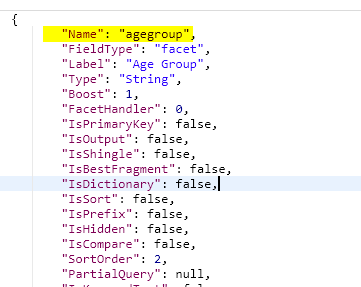
Please make sure that the field 'Name' is unique and a field with the same name does not exist already. You can first get a list of all fields using '/api/v11/FieldInfo' or get this particular field information using field name 'api/v11/Field?fieldName={fieldName}' before creating a new field.
-
The 'FieldType' can only have one of the 4 possible values:
- facet
- keyword
- unindexed
- text
-
Multiple fields can have the same 'Label' value as long as the Name is unique.
-
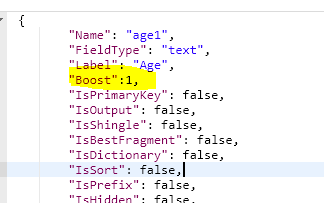
Boost has to be set to 1 when IsQuery=false.
-
IsPrimaryKey should always be set to 'false' unless you want to mark that field as a Primary Key. Note that only one field can be a Primary Key and it is suggested to NOT change it often as it might have a negative impact on site functionality. Please contact Hawksearch if you would like to change the Primary Key.
-
IsOutput should be set to 'true' only if you need the field value in the search response. Please always set it to 'false' if not in use.
-
IsShingle corresponds to "Add phrases to 'Did you Mean'?" under the field settings on the dashboard. It has to be set to false when IsQuery=false.
-
If IsQuery=true, then IsShingle can be set to true only for "Type": "string". You cannot use it for types 'Numeric' or 'Boolean'.
-
If IsQuery=true, then IsShingle can be set to true only for "FieldType": "facet", "keyword" and "keywordtext". You cannot use it for field types 'unindexed' or 'text'.
- {keyword, "Field values indexed 'as is' AND are stemmed"} >> "IsKeywordText will be set to 1"
- {keyword, "Field values are NOT stemmed"} >> "IsKeywordText will be set to 0"
- {text, "Field values are ONLY stemmed (search only)"}
- {unindexed, "Stored only, not used for search nor facets"}
- {facet, "Field values are NOT stemmed"} >> The field type value changes to 'facet' from 'keyword' if you set up this field as a facet. For fields that will be used as a facet, please set up field type as 'facet'.
-
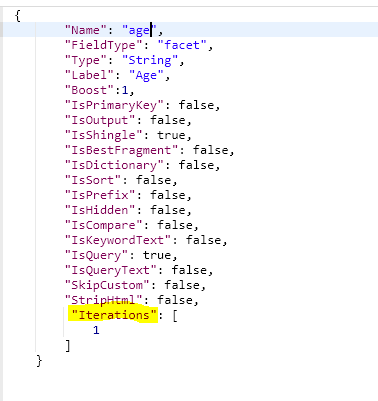
Iterations can be skipped from the request, but if IsQuery=true and IsShingle=true then we need to set the Iterations value by default to 1.
-
Type is the datatype of the field. One of the 3 possible values is String, Single, Boolean. If you set a field as IsQuery=true and IsShingle=true then you need to always pass the Type information in the request, as IsShingle cannot be used for types 'Numeric' or 'Boolean'.
-
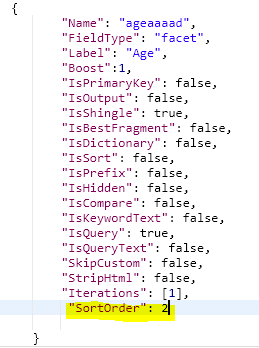
SortOrder field is optional and can be passed if you would like to maintain a specific order for all the field values. The value should always be numeric.
Update a Field
This API allows you to update a field in the Hawksearch dashboard and manage the field configurations.
Example use case: Update the label of a Brand field.
Request
| Endpoint | Method | Header Key |
|---|---|---|
| api/v11/Field/{FieldId} | PUT | X-HawkSearch-ApiKey: {API key} |
REST reference: Update field by id
Parameters
The request body is a Field Object. See Field Object section.
Examples
{
    "FieldId": 479976,
    "SyncGuid": "5cf5ea85-ab8a-45a1-86bd-7e87165e4fbb",
    "Name": "brand",
    "FieldType": "facet",
    "Label": "Brand New Label",
    "Type": "String",
    "Boost": 1,
    "FacetHandler": 0,
    "IsPrimaryKey": false,
    "IsOutput": true,
    "IsShingle": false,
    "IsBestFragment": false,
    "IsDictionary": false,
    "IsSort": false,
    "IsPrefix": false,
    "IsHidden": false,
    "IsCompare": false,
    "SortOrder": 0,
    "PartialQuery": "",
    "IsKeywordText": true,
    "IsQuery": false,
    "IsQueryText": false,
    "SkipCustom": false,
    "StripHtml": false,
    "MinNGramAnalyzer": 2,
    "MaxNGramAnalyzer": 15,
    "CoordinateType": 0,
    "OmitNorms": false,
    "ItemMapping": "",
    "DefaultValue": "",
    "UseForPrediction": false,
    "CopyTo": "",
    "Analyzer": "",
    "DoNotStore": false,
    "Tags": "",
    "Iterations": [
        1
    ],
    "AnalyzerLanguage": "",
    "PreviewMapping": null,
    "OmitTfAndPos": false,
    "CreateDate": "02-04-2021",
    "ModifyDate": "02-04-2021",
    "IsPrependBaseUrl": true
}
Response
The response is a Field Object, a series of key-value pairs. See Field Object section.
Examples
{
    "FieldId": 479976,
    "SyncGuid": "5cf5ea85-ab8a-45a1-86bd-7e87165e4fbb",
    "Name": "Brand",
    "FieldType": "facet",
    "Label": "Brand New Label",
    "Type": "String",
    "Boost": 1,
    "FacetHandler": 0,
    "IsPrimaryKey": false,
    "IsOutput": true,
    "IsShingle": false,
    "IsBestFragment": false,
    "IsDictionary": false,
    "IsSort": false,
    "IsPrefix": false,
    "IsHidden": false,
    "IsCompare": false,
    "SortOrder": 10,
    "PartialQuery": "",
    "IsKeywordText": false,
    "IsQuery": false,
    "IsQueryText": false,
    "SkipCustom": false,
    "StripHtml": false,
    "MinNGramAnalyzer": 2,
    "MaxNGramAnalyzer": 15,
    "CoordinateType": 0,
    "OmitNorms": false,
    "ItemMapping": "",
    "DefaultValue": "",
    "UseForPrediction": false,
    "CopyTo": "",
    "Analyzer": "",
    "DoNotStore": false,
    "Tags": "",
    "Iterations": [
        1
    ],
    "AnalyzerLanguage": null,
    "PreviewMapping": null,
    "OmitTfAndPos": false,
    "CreateDate": "03-08-2021",
    "ModifyDate": "03-08-2021",
    "IsPrependBaseUrl": true
}
Get Field Information
This API allows you to get a field configuration stored in the Hawksearch Dashboard.
Example use case: Get the field information of a Brand field.
Request
| Endpoint | Method | Header Key |
|---|---|---|
| api/v11/Field?fieldName={fieldName} | GET | X-HawkSearch-ApiKey: {API key} |
Examples
GET /api/v11/Field/?fieldName=brand HTTP/1.1
Host: dashboard-na.hawksearch.com
X-HawkSearch-ApiKey: USE_YOUR_API_KEY
Cache-Control: no-cache
Postman-Token: cd457184-4c00-a650-62f2-530f22a9a384
Response
The response is a Field Object, a series of key-value pairs. See Field Object section.
Examples
{
    "FieldId": 479976,
    "SyncGuid": "5cf5ea85-ab8a-45a1-86bd-7e87165e4fbb",
    "Name": "Brand",
    "FieldType": "facet",
    "Label": "Brand",
    "Type": "String",
    "Boost": 1,
    "FacetHandler": 0,
    "IsPrimaryKey": false,
    "IsOutput": true,
    "IsShingle": false,
    "IsBestFragment": false,
    "IsDictionary": false,
    "IsSort": false,
    "IsPrefix": false,
    "IsHidden": false,
    "IsCompare": false,
    "SortOrder": 10,
    "PartialQuery": "",
    "IsKeywordText": false,
    "IsQuery": false,
    "IsQueryText": false,
    "SkipCustom": false,
    "StripHtml": false,
    "MinNGramAnalyzer": 2,
    "MaxNGramAnalyzer": 15,
    "CoordinateType": 0,
    "OmitNorms": false,
    "ItemMapping": "",
    "DefaultValue": "",
    "UseForPrediction": false,
    "CopyTo": "",
    "Analyzer": "",
    "DoNotStore": false,
    "Tags": "",
    "Iterations": [
        1
    ],
    "AnalyzerLanguage": null,
    "PreviewMapping": null,
    "OmitTfAndPos": false,
    "CreateDate": "03-08-2021",
    "ModifyDate": "03-08-2021",
    "IsPrependBaseUrl": true
}
Get Field ID / Name Information
This API allows you to get a list of all fields (FieldId and Name) stored in the Hawksearch Dashboard.
Example use case: Get all fields information.
Request
| Endpoint | Method | Header Key |
|---|---|---|
| api/v11/FieldInfo | GET | X-HawkSearch-ApiKey: {API key} |
REST reference: Get field info
Response
The response is an array of Field Info Objects, each a series of key-value pairs. See Field Info Object section.
Examples
[
    {
        "FieldId": 12345,
        "Name": "agegroup"
    },
    {
        "FieldId": 412587,
        "Name": "color"
    },
    {
        "FieldId": 741258,
        "Name": "brand"
    },
    {
        "FieldId": 745896,
        "Name": "name"
    }
]
Field Info for a specific field
REST reference: Get field info by id
Returns the Field with a particular Id.
Parameters:
- id: Unique Id of the Field (FromUri)
Get All Fields
This API allows you to get the field configuration for all fields stored in the Hawksearch Dashboard.
Example use case: Get the field information of all fields.
Request
| Endpoint | Method | Header Key |
|---|---|---|
| api/v11/Field | GET | X-HawkSearch-ApiKey: {API key} |
REST reference: Get fields
Response
The response is an array of Field Objects, each a series of key-value pairs. See Field Object section.
Examples
[
    {
        "FieldId": 408,
        "SyncGuid": "90928773-2586-4c5f-b2b6-09fcdd9aabed",
        "Name": "price",
        "FieldType": "facet",
        "Label": "Price",
        "Type": "Single",
        "Boost": 1,
        "FacetHandler": 0,
        "IsPrimaryKey": false,
        "IsOutput": true,
        "IsShingle": false,
        "IsBestFragment": false,
        "IsDictionary": false,
        "IsSort": true,
        "IsPrefix": false,
        "IsHidden": false,
        "IsCompare": false,
        "SortOrder": 6,
        "PartialQuery": "",
        "IsKeywordText": true,
        "IsQuery": false,
        "IsQueryText": false,
        "SkipCustom": false,
        "StripHtml": false,
        "MinNGramAnalyzer": 2,
        "MaxNGramAnalyzer": 15,
        "CoordinateType": 0,
        "OmitNorms": false,
        "ItemMapping": "Price",
        "DefaultValue": "",
        "UseForPrediction": false,
        "CopyTo": "",
        "Analyzer": "",
        "DoNotStore": false,
        "Tags": "",
        "Iterations": [
            1
        ],
        "AnalyzerLanguage": null,
        "PreviewMapping": "Price",
        "OmitTfAndPos": false,
        "CreateDate": "02-05-2021",
        "ModifyDate": "02-05-2021"
    },
    {
        "FieldId": 48,
        "SyncGuid": "af586ac2-6fb3-4446-84f8-23df916d6e0c",
        "Name": "name",
        "FieldType": "keyword",
        "Label": "Product name",
        "Type": "String",
        "Boost": 1,
        "FacetHandler": 0,
        "IsPrimaryKey": false,
        "IsOutput": true,
        "IsShingle": false,
        "IsBestFragment": false,
        "IsDictionary": false,
        "IsSort": false,
        "IsPrefix": false,
        "IsHidden": false,
        "IsCompare": false,
        "SortOrder": 7,
        "PartialQuery": "",
        "IsKeywordText": true,
        "IsQuery": true,
        "IsQueryText": false,
        "SkipCustom": false,
        "StripHtml": false,
        "MinNGramAnalyzer": 2,
        "MaxNGramAnalyzer": 15,
        "CoordinateType": 0,
        "OmitNorms": false,
        "ItemMapping": "ItemName",
        "DefaultValue": "",
        "UseForPrediction": false,
        "CopyTo": "",
        "Analyzer": "",
        "DoNotStore": false,
        "Tags": "",
        "Iterations": [
            1
        ],
        "AnalyzerLanguage": null,
        "PreviewMapping": "Title",
        "OmitTfAndPos": false,
        "CreateDate": "02-05-2021",
        "ModifyDate": "02-26-2021"
    },
    {
        "FieldId": 479977,
        "SyncGuid": "5cf5ea85-ab8a-45a1-86bd-7e87165e4fbb",
        "Name": "Brand",
        "FieldType": "facet",
        "Label": "Brand",
        "Type": "String",
        "Boost": 1,
        "FacetHandler": 0,
        "IsPrimaryKey": false,
        "IsOutput": true,
        "IsShingle": false,
        "IsBestFragment": false,
        "IsDictionary": false,
        "IsSort": false,
        "IsPrefix": false,
        "IsHidden": false,
        "IsCompare": false,
        "SortOrder": 10,
        "PartialQuery": "",
        "IsKeywordText": false,
        "IsQuery": false,
        "IsQueryText": false,
        "SkipCustom": false,
        "StripHtml": false,
        "MinNGramAnalyzer": 2,
        "MaxNGramAnalyzer": 15,
        "CoordinateType": 0,
        "OmitNorms": false,
        "ItemMapping": "",
        "DefaultValue": "",
        "UseForPrediction": false,
        "CopyTo": "",
        "Analyzer": "",
        "DoNotStore": false,
        "Tags": "",
        "Iterations": [
            1
        ],
        "AnalyzerLanguage": null,
        "PreviewMapping": null,
        "OmitTfAndPos": false,
        "CreateDate": "03-08-2021",
        "ModifyDate": "03-08-2021"
    }
]
Delete a Field
This API allows you to delete a field from the Hawksearch dashboard Fields section.
Example use case: Delete a Brand field.
Request
Pass the FieldId of the field you want to delete in the API request.
| Endpoint | Method | Header Key |
|---|---|---|
| api/v11/Field/{FieldId} | DELETE | X-HawkSearch-ApiKey: {API key} |
REST reference: Delete field by id
Response
The response is the deleted Field Object, a series of key-value pairs. See Field Object section.
Examples
{
    "FieldId": 479976,
    "SyncGuid": "5cf5ea85-ab8a-45a1-86bd-7e87165e4fbb",
    "Name": "Brand",
    "FieldType": "facet",
    "Label": "Brand",
    "Type": "String",
    "Boost": 1,
    "FacetHandler": 0,
    "IsPrimaryKey": false,
    "IsOutput": true,
    "IsShingle": false,
    "IsBestFragment": false,
    "IsDictionary": false,
    "IsSort": false,
    "IsPrefix": false,
    "IsHidden": false,
    "IsCompare": false,
    "SortOrder": 10,
    "PartialQuery": "",
    "IsKeywordText": false,
    "IsQuery": false,
    "IsQueryText": false,
    "SkipCustom": false,
    "StripHtml": false,
    "MinNGramAnalyzer": 2,
    "MaxNGramAnalyzer": 15,
    "CoordinateType": 0,
    "OmitNorms": false,
    "ItemMapping": "",
    "DefaultValue": "",
    "UseForPrediction": false,
    "CopyTo": "",
    "Analyzer": "",
    "DoNotStore": false,
    "Tags": "",
    "Iterations": [
        1
    ],
    "AnalyzerLanguage": null,
    "PreviewMapping": null,
    "OmitTfAndPos": false,
    "CreateDate": "03-08-2021",
    "ModifyDate": "03-08-2021"
}
Objects
Field Object
The Field Object is returned in the Create, Update, Get Field Information, Get All Fields, and Delete a Field methods. Each field object is a series of key-value pairs.
Description
| No | Key | Dashboard Value | Description | Value Type |
|---|---|---|---|---|
| 1 | FieldId | The unique identifier of the field (unique across the whole system) | Number | |
| 2 | SyncGuid | Internal field | GUID | |
| 3 | Name | Field Name | Name unique to an engine (can be the same for one or more engines) | lowercase alphanumeric string with underscores allowed |
| 4 | FieldType | Field Type | One of the below field configuration options: Field Values are NOT stemmed - keyword or facet (facet if there is a corresponding facet else keyword) Field values are ONLY stemmed (search only) - text Field Values indexed “as is” AND are stemmed - keyword or facet (facet if there is a corresponding facet else keyword) Stored only, not used for search or facets - unindexed | Valid options: facet keyword unindexed text |
| 5 | Label | Label | Display name of the field | Alphanumeric string |
| 6 | Type | Save As | Datatype of the field | Valid options: String, Single, Boolean, Datetime, OR GeoPoint |
| 7 | Boost | Boost | Boost value set on the field | Number between 1 and 200, inclusive |
| 8 | FacetHandler | Internal handler associated with the field | Alphanumeric | |
| 9 | IsPrimaryKey | Primary Key? | Flag to set as primary field | Boolean |
| 10 | IsOutput | Include In Results? | Flag to control presence in response | Boolean |
| 11 | IsShingle | Add phrases to "Did You Mean"? | Corresponds to Add phrases to "Did you Mean"? under the field settings on the dashboard | Boolean |
| 12 | IsBestFragment | Best Fragment Field? | Flag controls creating synopses for large textual content | Boolean |
| 13 | IsDictionary | Include In Dictionary? | Flag to include field for autocorrect suggestions | Boolean |
| 14 | IsSort | Enable Sorting? | Flag to allow sorting on search results page | Boolean |
| 15 | IsPrefix | Flag to indicate if the field is a prefix type. (This is obsolete, please set PartialQuery property to partial instead) | Boolean | |
| 16 | IsHidden | Hide in Query Builder? | Flag to control query builder configuration for the field | Boolean |
| 17 | IsCompare | Use for comparing? | Flag to manage comparison display | Boolean |
| 18 | SortOrder | Sort order of the field | Numeric | |
| 19 | PartialQuery | Partial Query Type | Query type for the field | None, Prefix or Wildcard |
| 20 | IsKeywordText | Indicates that the field values indexed ""as is"" AND are stemmed | Boolean | |
| 21 | IsQuery | Query this field? | Flag to allow querying on the field | Boolean |
| 22 | IsQueryText | Flag to show query text value | Boolean | |
| 23 | SkipCustom | Skip from Custom? | Flag to control display in custom group | Boolean |
| 24 | StripHtml | Strip HTML | Flag to remove html content | Boolean |
| 25 | MinNGramAnalyzer | Min Ngram Analyzer | Minimum value for ngram analyzer (for queryable fields) | Numeric, 2 to 15 inclusive |
| 26 | MaxNGramAnalyzer | Max Ngram Analyzer | Maximum value for ngram analyzer (for queryable fields) | Numeric, 2 to 15 inclusive |
| 27 | CoordinateType | Coordinate type | Used for latitude and longitude | Alphanumeric |
| 28 | OmitNorms | Omit Norms | Flag to enable/disable smaller document to score higher | Boolean |
| 29 | ItemMapping | Field Mapping (Recommendations) | Field mapping value | Fieldname |
| 30 | DefaultValue | Default Value (Recommendations) | Value to show when empty | Alphanumeric |
| 31 | UseForPrediction | Export to Prediction Engine | Flag to indicate that field is used in Recs | Boolean |
| 32 | CopyTo | Copy To | List of fields to copy values into (redundancy) | List of alphanumeric fieldnames |
| 33 | Analyzer | Analyzer | Corresponds to the drop down list of Analyzers to be chosen | Alphanumeric |
| 34 | DoNotStore | Do not store in index? | Flag to control storage (helps to increase performance by reducing index size) | Boolean |
| 35 | Tags | Tags | Engine-wide labels (available across complete dashboard) | Comma separated alphanumeric string |
| 36 | Iteration | Include in query iterations | Query iterations | Array of numeric values |
| 37 | AnalyzerLanguage | Analyzer Language | Natural language choice for query analyzer | Alphanumeric |
| 38 | PreviewMapping | Preview Mapping | Available for API indexing enabled engines | Fieldname |
| 39 | OmitTfAndPos | Omit Term Freq and Positions | Flag to omit term frequency | Boolean |
| 40 | CreateDate | Field creation date | Date string in MM-DD-YYYY format | |
| 41 | ModifyDate | Field modification date | Date string in MM-DD-YYYY format | |
| 42 | IsHierarchical | Is Hierarchical Field? | Flag if a field is hierarchical | Boolean |
| 43 | IsPrependBaseUrl | Flag if a field stores relative url | Boolean |
Field Info Object
The Field Info Object is returned in the Get Field ID / Name Information method. It is a lightweight representation of a field containing only its identifier and name.
Description
| No | Key | Description | Value Type |
|---|---|---|---|
| 1 | FieldId | The unique identifier of the field (unique across the whole system) | Number |
| 2 | Name | Name unique to an engine (can be the same for one or more engines) | lowercase alphanumeric string with underscores allowed |
Boolean Value Configuration Restriction
Previously, it was possible to configure a Boolean value with the "Field values indexed 'as is' AND are stemmed" field type. However, this setup is not suitable for a Boolean value and could cause indexing inefficiencies or errors. Since the Hermes release, this configuration is no longer available, ensuring Boolean fields are only assigned compatible field types.
Affected Endpoints
- Single Field Creation: /api/v11/Field
- Bulk Field Creation: /api/v11/Field/bulk
Disallowed Combination
- "Type": "Boolean"
- "IsKeywordText": "true"
Brand field that can be used as a facet filter.
Request: POST request to the API below:
{
    "FieldId": 0,
    "SyncGuid": "00000000-0000-0000-0000-000000000000",
    "Name": "brand",
    "FieldType": "facet",
    "Label": "Brand",
    "Type": "String",
    "Boost": 1,
    "FacetHandler": 0,
    "IsPrimaryKey": false,
    "IsOutput": true,
    "IsShingle": false,
    "IsBestFragment": false,
    "IsDictionary": false,
    "IsSort": false,
    "IsPrefix": false,
    "IsHidden": false,
    "IsCompare": false,
    "SortOrder": 0,
    "PartialQuery": "",
    "IsKeywordText": true,
    "IsQuery": false,
    "IsQueryText": false,
    "SkipCustom": false,
    "StripHtml": false,
    "MinNGramAnalyzer": 2,
    "MaxNGramAnalyzer": 15,
    "CoordinateType": 0,
    "OmitNorms": false,
    "ItemMapping": "",
    "DefaultValue": "",
    "UseForPrediction": false,
    "CopyTo": "",
    "Analyzer": "",
    "DoNotStore": false,
    "Tags": "",
    "Iterations": [
        1
    ],
    "AnalyzerLanguage": "",
    "PreviewMapping": null,
    "OmitTfAndPos": false,
    "CreateDate": "02-04-2021",
    "ModifyDate": "02-04-2021"
}
Response: The response is an array of field objects, every field object being a series of key-value pairs. Description of the data is as follows:
| No | Key | Description | Value Type |
|---|---|---|---|
| 1 | FieldId | The unique identifier of the field (unique across the whole system) | Number |
| 2 | SyncGuid | Internal field | GUID |
| 3 | Name | Name unique to an engine (can be the same for one or more engines) | lowercase alphanumeric string with underscores allowed |
| 4 | FieldType | One of the below field configuration options: Field Values are NOT stemmed - keyword or facet (facet if there is a corresponding facet else keyword) Field values are ONLY stemmed (search only) - text Field Values indexed “as is” AND are stemmed - keyword or facet (facet if there is a corresponding facet else keyword) Stored only, not used for search or facets - unindexed | Valid options: facet keyword unindexed text |
| 5 | Label | Display name of the field | Alphanumeric string |
| 6 | Type | Datatype of the field | Valid options: String, Single, Boolean, Datetime, OR GeoPoint |
| 7 | Boost | Boost value set on the field | Number between 1 and 200, inclusive |
| 8 | FacetHandler | Internal handler associated with the field | Alphanumeric |
| 9 | IsPrimaryKey | Flag to set as primary field | Boolean |
| 10 | IsOutput | Flag to control presence in response | Boolean |
| 11 | IsShingle | Corresponds to Add phrases to "Did you Mean"? under the field settings on the dashboard | Boolean |
| 12 | IsBestFragment | Flag controls creating synopses for large textual content | Boolean |
| 13 | IsDictionary | Flag to include field for autocorrect suggestions | Boolean |
| 14 | IsSort | Flag to allow sorting on search results page | Boolean |
| 15 | IsPrefix | Flag to indicate if the field is a prefix type. (This is obsolete, please set PartialQuery property to partial instead) | Boolean |
| 16 | IsHidden | Flag to control query builder configuration for the field | Boolean |
| 17 | IsCompare | Flag to manage comparison display | Boolean |
| 18 | SortOrder | Sort order of the field | Numeric |
| 19 | PartialQuery | Query type for the field | None, Prefix or Wildcard |
| 20 | IsKeywordText | Indicates that the field values indexed ""as is"" AND are stemmed | Boolean |
| 21 | IsQuery | Flag to allow querying on the field | Boolean |
| 22 | IsQueryText | Flag to show query text value | Boolean |
| 23 | SkipCustom | Flag to control display in custom group | Boolean |
| 24 | StripHtml | Flag to remove html content | Boolean |
| 25 | MinNGramAnalyzer | Minimum value for ngram analyzer (for queryable fields) | Numeric, 2 to 15 inclusive |
| 26 | MaxNGramAnalyzer | Maximum value for ngram analyzer (for queryable fields) | Numeric, 2 to 15 inclusive |
| 27 | CoordinateType | Used for latitude and longitude | Alphanumeric |
| 28 | OmitNorms | Flag to enable/disable smaller document to score higher | Boolean |
| 29 | ItemMapping | Field mapping value | Fieldname |
| 30 | DefaultValue | Value to show when empty | Alphanumeric |
| 31 | UseForPrediction | Flag to indicate that field is used in Recs | Boolean |
| 32 | CopyTo | List of fields to copy values into (redundancy) | List of alphanumeric fieldnames |
| 33 | Analyzer | Corresponds to the drop down list of Analyzers to be chosen | Alphanumeric |
| 34 | DoNotStore | Flag to control storage (helps to increase performance by reducing index size) | Boolean |
| 35 | Tags | Engine-wide labels (available across complete dashboard) | Comma separated alphanumeric string |
| 36 | Iterations | Query iterations | Array of numeric values |
| 37 | AnalyzerLanguage | Natural language choice for query analyzer | Alphanumeric |
| 38 | PreviewMapping | Available for API indexing enabled engines | Fieldname |
| 39 | OmitTfAndPos | Flag to omit term frequency | Boolean |
| 40 | CreateDate | Field creation date | Date string in MM-DD-YYYY format |
| 41 | ModifyDate | Field modification date | Date string in MM-DD-YYYY format |
| 42 | IsHierarchical | Flag if a field is hierarchical | Boolean |
| 43 | IsPrependBaseUrl | Flag if a field stores relative url | Boolean |
{
    "FieldId": 479976,
    "SyncGuid": "1a0db291-d004-4cfa-a894-1ac8cadbe110",
    "Name": "Brand",
    "FieldType": "facet",
    "Label": "brand",
    "Type": "String",
    "Boost": 1,
    "FacetHandler": 0,
    "IsPrimaryKey": false,
    "IsOutput": true,
    "IsShingle": false,
    "IsBestFragment": false,
    "IsDictionary": false,
    "IsSort": false,
    "IsPrefix": false,
    "IsHidden": false,
    "IsCompare": false,
    "SortOrder": 11,
    "PartialQuery": "",
    "IsKeywordText": false,
    "IsQuery": false,
    "IsQueryText": false,
    "SkipCustom": false,
    "StripHtml": false,
    "MinNGramAnalyzer": 2,
    "MaxNGramAnalyzer": 15,
    "CoordinateType": 0,
    "OmitNorms": false,
    "ItemMapping": "",
    "DefaultValue": "",
    "UseForPrediction": false,
    "CopyTo": "",
    "Analyzer": "",
    "DoNotStore": false,
    "Tags": "",
    "Iterations": [
        1
    ],
    "AnalyzerLanguage": null,
    "PreviewMapping": null,
    "OmitTfAndPos": false,
    "CreateDate": "03-08-2021",
    "ModifyDate": "03-08-2021",
    "IsPrependBaseUrl": true
}
Best Practices
REST URL: Get fields
Method: POST
Authentication: Basic (Engine API Key)
- When creating a new field, you need to make sure that the following attributes are always sent in the request payload otherwise the request would be invalid.
  {
        "Name": "age",
        "FieldType": "keyword",
        "Type": "String",
        "Label": "Age",
        "Boost": 1,
        "IsPrimaryKey": false,
        "IsOutput": false,
        "IsShingle": false,
        "IsBestFragment": false,
        "IsDictionary": false,
        "IsSort": false,
        "IsPrefix": false,
        "IsHidden": false,
        "IsCompare": false,
        "IsKeywordText": false,
        "IsQuery": false,
        "IsQueryText": false,
        "SkipCustom": false,
        "StripHtml": false
    }
- Please make sure that the field ‘Name’ is unique and a field with the same name does not exist already. You can first get a list of all fields using ‘/api/v11/FieldInfo’ or get this particular field information using field name 'api/v11/Field?fieldName={fieldName}' before creating a new field
- The ‘Fieldtype’ can only have one of the 4 possible values (refer to Best Practices section below):
- facet
- keyword
- unindexed
- text
- Multiple fields can have the same ‘Label’ value as long as the Name is unique.
- Boost has to be set to 1 when IsQuery=false
- IsPrimaryKey should be always set to ‘false’ unless you want to mark that field as a Primary Key. Note that only one field can be a Primary key and it is suggested to NOT change it often as it might have a negative impact on site functionality. Please contact Hawksearch if you would like to change the Primary key.
- IsOutput should be set to ‘true’ only if you need the field value in the search response. Please always set it to ‘false’ if not in use.
- IsShingle corresponds to Add phrases to "Did you Mean"? under the field settings on the dashboard. It has to be set to false when IsQuery=false.
- If IsQuery=true, then IsShingle can be set to true only for "Type": "string". You can not use it for types ‘Numeric’ or ‘Boolean’.
- If IsQuery=true, then IsShingle can be set to true only for "FieldType": "facet", “keyword” and ”keywordtext”. You can not use it for field types ‘unindexed’, ‘text’.
{keyword, "Field values indexed ""as is"" AND are stemmed"} >> “IsKeywordText will be set to 1” ,
{keyword, "Field values are NOT stemmed"}>> “IsKeywordText will be set to 0”,
{text, "Field values are ONLY stemmed (search only)"},
{unindexed, "Stored only, not used for search nor facets"},
{facet, "Field values are NOT stemmed"}} >> The field type value changes to ‘facet’ from ‘keyword’ if you set up this field as a facet. For fields that will be used as facet, please set up field type as ‘facet’.
- Iterations can be skipped from the request but if IsQuery=true, IsShingle = true then we need to set the Iterations value by default to 1.
- Type is the datatype of the field. One of the 3 possible values is String, Single, Boolean. If you set a field as IsQuery=true and IsShingle = true then you need to always pass the Type information in the request as IsShingle cannot be used for types ‘Numeric’ or ‘Boolean’.
- SortOrder field is optional and can be passed if you would like to maintain a specifc order for all the field values. The value should always be numeric.
Using API to Update Fields
This API allows you to update a field in Hawksearch dashboard and manage the field configurations.
Example use case: Update label of a Brand field.
Request: PUT request to the API below:
{
    "FieldId": 479976,
    "SyncGuid": "5cf5ea85-ab8a-45a1-86bd-7e87165e4fbb",
    "Name": "brand",
    "FieldType": "facet",
    "Label": "Brand New Label",
    "Type": "String",
    "Boost": 1,
    "FacetHandler": 0,
    "IsPrimaryKey": false,
    "IsOutput": true,
    "IsShingle": false,
    "IsBestFragment": false,
    "IsDictionary": false,
    "IsSort": false,
    "IsPrefix": false,
    "IsHidden": false,
    "IsCompare": false,
    "SortOrder": 0,
    "PartialQuery": "",
    "IsKeywordText": true,
    "IsQuery": false,
    "IsQueryText": false,
    "SkipCustom": false,
    "StripHtml": false,
    "MinNGramAnalyzer": 2,
    "MaxNGramAnalyzer": 15,
    "CoordinateType": 0,
    "OmitNorms": false,
    "ItemMapping": "",
    "DefaultValue": "",
    "UseForPrediction": false,
    "CopyTo": "",
    "Analyzer": "",
    "DoNotStore": false,
    "Tags": "",
    "Iterations": [
        1
    ],
    "AnalyzerLanguage": "",
    "PreviewMapping": null,
    "OmitTfAndPos": false,
    "CreateDate": "02-04-2021",
    "ModifyDate": "02-04-2021",
    "IsPrependBaseUrl": true
}
Response: The response is an array of field objects, every field object being a series of key-value pairs.
{
    "FieldId": 479976,
    "SyncGuid": "5cf5ea85-ab8a-45a1-86bd-7e87165e4fbb",
    "Name": "Brand",
    "FieldType": "facet",
    "Label": "Brand New Label",
    "Type": "String",
    "Boost": 1,
    "FacetHandler": 0,
    "IsPrimaryKey": false,
    "IsOutput": true,
    "IsShingle": false,
    "IsBestFragment": false,
    "IsDictionary": false,
    "IsSort": false,
    "IsPrefix": false,
    "IsHidden": false,
    "IsCompare": false,
    "SortOrder": 10,
    "PartialQuery": "",
    "IsKeywordText": false,
    "IsQuery": false,
    "IsQueryText": false,
    "SkipCustom": false,
    "StripHtml": false,
    "MinNGramAnalyzer": 2,
    "MaxNGramAnalyzer": 15,
    "CoordinateType": 0,
    "OmitNorms": false,
    "ItemMapping": "",
    "DefaultValue": "",
    "UseForPrediction": false,
    "CopyTo": "",
    "Analyzer": "",
    "DoNotStore": false,
    "Tags": "",
    "Iterations": [
        1
    ],
    "AnalyzerLanguage": null,
    "PreviewMapping": null,
    "OmitTfAndPos": false,
    "CreateDate": "03-08-2021",
    "ModifyDate": "03-08-2021",
    "IsPrependBaseUrl": true
}
Using API to Get Field Information
This API allows you to get field configuration stored in Hawksearch Dashboard
Example use case: Get field information of a Brand field.
Request: GET request to the API below:
GET /api/v11/Field/?fieldName=brand HTTP/1.1
Host: dashboard-na.hawksearch.com
X-HawkSearch-ApiKey: USE_YOUR_API_KEY
Cache-Control: no-cache
Postman-Token: cd457184-4c00-a650-62f2-530f22a9a384
Response: The response is an array of field objects, every field object being a series of key-value pairs.
{
    "FieldId": 479976,
    "SyncGuid": "5cf5ea85-ab8a-45a1-86bd-7e87165e4fbb",
    "Name": "Brand",
    "FieldType": "facet",
    "Label": "Brand",
    "Type": "String",
    "Boost": 1,
    "FacetHandler": 0,
    "IsPrimaryKey": false,
    "IsOutput": true,
    "IsShingle": false,
    "IsBestFragment": false,
    "IsDictionary": false,
    "IsSort": false,
    "IsPrefix": false,
    "IsHidden": false,
    "IsCompare": false,
    "SortOrder": 10,
    "PartialQuery": "",
    "IsKeywordText": false,
    "IsQuery": false,
    "IsQueryText": false,
    "SkipCustom": false,
    "StripHtml": false,
    "MinNGramAnalyzer": 2,
    "MaxNGramAnalyzer": 15,
    "CoordinateType": 0,
    "OmitNorms": false,
    "ItemMapping": "",
    "DefaultValue": "",
    "UseForPrediction": false,
    "CopyTo": "",
    "Analyzer": "",
    "DoNotStore": false,
    "Tags": "",
    "Iterations": [
        1
    ],
    "AnalyzerLanguage": null,
    "PreviewMapping": null,
    "OmitTfAndPos": false,
    "CreateDate": "03-08-2021",
    "ModifyDate": "03-08-2021",
    "IsPrependBaseUrl": true
}
Using API to Get FieldId/Name Information
This API allows you to get all fields list (FieldId and Name) stored in Hawksearch Dashboard.
Example use case: Get all fields information.
Request: GET request to the API below:
Get field info API Documentation
Response: The response is an array of field objects, every field object being a series of key-value pairs. Description of the data is as follows:
| No | Key | Description | Value Type |
|---|---|---|---|
| 1 | FieldId | The unique identifier of the field (unique across the whole system) | Number |
| 2 | Name | Name unique to an engine (can be the same for one or more engines) | lowercase alphanumeric string with underscores allowed |
[
    {
        "FieldId": 12345,
        "Name": "agegroup"
    },
    {
        "FieldId": 412587,
        "Name": "color"
    },
    {
        "FieldId": 741258,
        "Name": "brand"
    },
    {
        "FieldId": 745896,
        "Name": "name"
    }
  ]
Field Info for a specific field
Get field info by id API Documentation
Returns Field with a particular Id.
Parameters:
- id: Unique Id of the Field (FromUri)
Using API to Get All Fields
This API allows you to get field configuration for all fields stored in Hawksearch Dashboard.
Example use case: Get field information of all fields.
Request: GET request to the API below:
Response: The response is an array of field objects, every field object being a series of key-value pairs. Description of the data is as follows:
| No | Key | Description | Value Type |
|---|---|---|---|
| 1 | FieldId | The unique identifier of the field (unique across the whole system) | Number |
| 2 | SyncGuid | Internal field | GUID |
| 3 | Name | Name unique to an engine (can be the same for one or more engines) | lowercase alphanumeric string with underscores allowed |
| 4 | FieldType | One of the below field configuration options:Field Values are NOT stemmedField values are ONLY stemmed (search only)Field Values indexed “as is” AND are stemmedStored only, not used for search or facets | One of the 4 possible values - facetkeywordunindexedtext |
| 5 | Label | Display name of the field | Alphanumeric string |
| 6 | Type | Datatype of the field | One of the 3 possible values - SingleNumericString |
| 7 | Boost | Boost value set on the field | Number between 1 and 200, inclusive |
| 8 | FacetHandler | Internal handler associated with the field | Alphanumeric |
| 9 | IsPrimaryKey | Flag to set as primary field | Boolean |
| 10 | IsOutput | Flag to control presence in response | Boolean |
| 11 | IsShingle | Corresponds to Add phrases to "Did you Mean"? under the field settings on the dashboard | Boolean |
| 12 | IsBestFragment | Flag controls creating synopses for large textual content | Boolean |
| 13 | IsDictionary | Flag to include field for autocorrect suggestions | Boolean |
| 14 | IsSort | Flag to allow sorting on search results page | Boolean |
| 15 | IsPrefix | Flag to indicate if the field is a prefix type | Boolean |
| 16 | IsHidden | Flag to control query builder configuration for the field | Boolean |
| 17 | IsCompare | Flag to manage comparison display | Boolean |
| 18 | SortOrder | Sort order of the field | Numeric |
| 19 | PartialQuery | Query type for the field | None, Prefix or Wildcard |
| 20 | IsKeywordText | Indicates that the field values indexed ""as is"" AND are stemmed | Boolean |
| 21 | IsQuery | Flag to allow querying on the field | Boolean |
| 22 | IsQueryText | Flag to show query text value | Boolean |
| 23 | SkipCustom | Flag to control display in custom group | Boolean |
| 24 | StripHtml | Flag to remove html content | Boolean |
| 25 | MinNGramAnalyzer | Minimum value for ngram analyzer (for queryable fields) | Numeric, 2 to 15 inclusive |
| 26 | MaxNGramAnalyzer | Maximum value for ngram analyzer (for queryable fields) | Numeric, 2 to 15 inclusive |
| 27 | CoordinateType | Used for latitude and logitude | Alphanumeric |
| 28 | OmitNorms | Flag to enable/disable smaller document to score higher | Boolean |
| 29 | ItemMapping | Field mapping value | Fieldname |
| 30 | DefaultValue | Value to show when empty | Alphanumeric |
| 31 | UseForPrediction | Flag to indicate | |
| 32 | CopyTo | List of fields to copy values into (redundancy) | List of alphanumeric fieldnames |
| 33 | Analyzer | Corresponds to the drop down list of Analyzers to be chosen | Alphanumeric |
| 34 | DoNotStore | Flag to control storage (helps to increase performance by reducing index size) | Boolean |
| 35 | Tags | Engine-wide labels (avilable acros complete dashboard) | Comma separated alphanumeric string |
| 36 | Iterations | Query iterations | Array of numeric values |
| 37 | AnalyzerLanguage | Natural language choice for query analyzer | Alphanumeric |
| 38 | PreviewMapping | Available for API indexing enabled engines | Fieldname |
| 39 | OmitTfAndPos | Flag to omit term frequency | Boolean |
| 40 | CreateDate | Field creation date | Date string in MM-DD-YYYY format |
| 41 | ModifyDate | Field modification date | Date string in MM-DD-YYYY format |
| 42 | IsPrependBaseUrl | Flag if a field stores relative url | Boolean |
[
    {
        "FieldId": 408,
        "SyncGuid": "90928773-2586-4c5f-b2b6-09fcdd9aabed",
        "Name": "price",
        "FieldType": "facet",
        "Label": "Price",
        "Type": "Single",
        "Boost": 1,
        "FacetHandler": 0,
        "IsPrimaryKey": false,
        "IsOutput": true,
        "IsShingle": false,
        "IsBestFragment": false,
        "IsDictionary": false,
        "IsSort": true,
        "IsPrefix": false,
        "IsHidden": false,
        "IsCompare": false,
        "SortOrder": 6,
        "PartialQuery": "",
        "IsKeywordText": true,
        "IsQuery": false,
        "IsQueryText": false,
        "SkipCustom": false,
        "StripHtml": false,
        "MinNGramAnalyzer": 2,
        "MaxNGramAnalyzer": 15,
        "CoordinateType": 0,
        "OmitNorms": false,
        "ItemMapping": "Price",
        "DefaultValue": "",
        "UseForPrediction": false,
        "CopyTo": "",
        "Analyzer": "",
        "DoNotStore": false,
        "Tags": "",
        "Iterations": [
            1
        ],
        "AnalyzerLanguage": null,
        "PreviewMapping": "Price",
        "OmitTfAndPos": false,
        "CreateDate": "02-05-2021",
        "ModifyDate": "02-05-2021"
    },
    {
        "FieldId": 48,
        "SyncGuid": "af586ac2-6fb3-4446-84f8-23df916d6e0c",
        "Name": "name",
        "FieldType": "keyword",
        "Label": "Product name",
        "Type": "String",
        "Boost": 1,
        "FacetHandler": 0,
        "IsPrimaryKey": false,
        "IsOutput": true,
        "IsShingle": false,
        "IsBestFragment": false,
        "IsDictionary": false,
        "IsSort": false,
        "IsPrefix": false,
        "IsHidden": false,
        "IsCompare": false,
        "SortOrder": 7,
        "PartialQuery": "",
        "IsKeywordText": true,
        "IsQuery": true,
        "IsQueryText": false,
        "SkipCustom": false,
        "StripHtml": false,
        "MinNGramAnalyzer": 2,
        "MaxNGramAnalyzer": 15,
        "CoordinateType": 0,
        "OmitNorms": false,
        "ItemMapping": "ItemName",
        "DefaultValue": "",
        "UseForPrediction": false,
        "CopyTo": "",
        "Analyzer": "",
        "DoNotStore": false,
        "Tags": "",
        "Iterations": [
            1
        ],
        "AnalyzerLanguage": null,
        "PreviewMapping": "Title",
        "OmitTfAndPos": false,
        "CreateDate": "02-05-2021",
        "ModifyDate": "02-26-2021"
    },
    {
        "FieldId": 479977,
        "SyncGuid": "5cf5ea85-ab8a-45a1-86bd-7e87165e4fbb",
        "Name": "Brand",
        "FieldType": "facet",
        "Label": "Brand",
        "Type": "String",
        "Boost": 1,
        "FacetHandler": 0,
        "IsPrimaryKey": false,
        "IsOutput": true,
        "IsShingle": false,
        "IsBestFragment": false,
        "IsDictionary": false,
        "IsSort": false,
        "IsPrefix": false,
        "IsHidden": false,
        "IsCompare": false,
        "SortOrder": 10,
        "PartialQuery": "",
        "IsKeywordText": false,
        "IsQuery": false,
        "IsQueryText": false,
        "SkipCustom": false,
        "StripHtml": false,
        "MinNGramAnalyzer": 2,
        "MaxNGramAnalyzer": 15,
        "CoordinateType": 0,
        "OmitNorms": false,
        "ItemMapping": "",
        "DefaultValue": "",
        "UseForPrediction": false,
        "CopyTo": "",
        "Analyzer": "",
        "DoNotStore": false,
        "Tags": "",
        "Iterations": [
            1
        ],
        "AnalyzerLanguage": null,
        "PreviewMapping": null,
        "OmitTfAndPos": false,
        "CreateDate": "03-08-2021",
        "ModifyDate": "03-08-2021"
    }
]
Using API to Delete a Field
This API allows you to delete a field from the Hawksearch dashboard Fields section.
Example use case: Delete Brand field.
Request: Please pass the fieldId of the field which you want to delete in the API request below:
Delete field by id API Documentation
Response: The response is an array of field objects, every field object being a series of key-value pairs. Description of the data is as follows:
| No | Key | Description | Value Type |
|---|---|---|---|
| 1 | FieldId | The unique identifier of the field (unique across the whole system) | Number |
| 2 | SyncGuid | Internal field | GUID |
| 3 | Name | Name unique to an engine (can be the same for one or more engines) | lowercase alphanumeric string with underscores allowed |
| 4 | FieldType | One of the below field configuration options:Field Values are NOT stemmedField values are ONLY stemmed (search only)Field Values indexed “as is” AND are stemmedStored only, not used for search or facets | One of the 4 possible values - facetkeywordunindexedtext |
| 5 | Label | Display name of the field | Alphanumeric string |
| 6 | Type | Datatype of the field | One of the 3 possible values - SingleNumericString |
| 7 | Boost | Boost value set on the field | Number between 1 and 200, inclusive |
| 8 | FacetHandler | Internal handler associated with the field | Alphanumeric |
| 9 | IsPrimaryKey | Flag to set as primary field | Boolean |
| 10 | IsOutput | Flag to control presence in response | Boolean |
| 11 | IsShingle | Corresponds to Add phrases to "Did you Mean"? under the field settings on the dashboard | Boolean |
| 12 | IsBestFragment | Flag controls creating synopses for large textual content | Boolean |
| 13 | IsDictionary | Flag to include field for autocorrect suggestions | Boolean |
| 14 | IsSort | Flag to allow sorting on search results page | Boolean |
| 15 | IsPrefix | Flag to indicate if the field is a prefix type | Boolean |
| 16 | IsHidden | Flag to control query builder configuration for the field | Boolean |
| 17 | IsCompare | Flag to manage comparison display | Boolean |
| 18 | SortOrder | Sort order of the field | Numeric |
| 19 | PartialQuery | Query type for the field | None, Prefix or Wildcard |
| 20 | IsKeywordText | Indicates that the field values indexed ""as is"" AND are stemmed | Boolean |
| 21 | IsQuery | Flag to allow querying on the field | Boolean |
| 22 | IsQueryText | Flag to show query text value | Boolean |
| 23 | SkipCustom | Flag to control display in custom group | Boolean |
| 24 | StripHtml | Flag to remove html content | Boolean |
| 25 | MinNGramAnalyzer | Minimum value for ngram analyzer (for queryable fields) | Numeric, 2 to 15 inclusive |
| 26 | MaxNGramAnalyzer | Maximum value for ngram analyzer (for queryable fields) | Numeric, 2 to 15 inclusive |
| 27 | CoordinateType | Used for latitude and logitude | Alphanumeric |
| 28 | OmitNorms | Flag to enable/disable smaller document to score higher | Boolean |
| 29 | ItemMapping | Field mapping value | Fieldname |
| 30 | DefaultValue | Value to show when empty | Alphanumeric |
| 31 | UseForPrediction | Flag to indicate | |
| 32 | CopyTo | List of fields to copy values into (redundancy) | List of alphanumeric fieldnames |
| 33 | Analyzer | Corresponds to the drop down list of Analyzers to be chosen | Alphanumeric |
| 34 | DoNotStore | Flag to control storage (helps to increase performance by reducing index size) | Boolean |
| 35 | Tags | Engine-wide labels (avilable acros complete dashboard) | Comma separated alphanumeric string |
| 36 | Iterations | Query iterations | Array of numeric values |
| 37 | AnalyzerLanguage | Natural language choice for query analyzer | Alphanumeric |
| 38 | PreviewMapping | Available for API indexing enabled engines | Fieldname |
| 39 | OmitTfAndPos | Flag to omit term frequency | Boolean |
| 40 | CreateDate | Field creation date | Date string in MM-DD-YYYY format |
| 41 | ModifyDate | Field modification date | Date string in MM-DD-YYYY format |
| 42 | IsPrependBaseUrl | Flag if a field stores relative url | Boolean |
{
        "FieldId": 479976,
        "SyncGuid": "5cf5ea85-ab8a-45a1-86bd-7e87165e4fbb",
        "Name": "Brand",
        "FieldType": "facet",
        "Label": "Brand",
        "Type": "String",
        "Boost": 1,
        "FacetHandler": 0,
        "IsPrimaryKey": false,
        "IsOutput": true,
        "IsShingle": false,
        "IsBestFragment": false,
        "IsDictionary": false,
        "IsSort": false,
        "IsPrefix": false,
        "IsHidden": false,
        "IsCompare": false,
        "SortOrder": 10,
        "PartialQuery": "",
        "IsKeywordText": false,
        "IsQuery": false,
        "IsQueryText": false,
        "SkipCustom": false,
        "StripHtml": false,
        "MinNGramAnalyzer": 2,
        "MaxNGramAnalyzer": 15,
        "CoordinateType": 0,
        "OmitNorms": false,
        "ItemMapping": "",
        "DefaultValue": "",
        "UseForPrediction": false,
        "CopyTo": "",
        "Analyzer": "",
        "DoNotStore": false,
        "Tags": "",
        "Iterations": [
            1
        ],
        "AnalyzerLanguage": null,
        "PreviewMapping": null,
        "OmitTfAndPos": false,
        "CreateDate": "03-08-2021",
        "ModifyDate": "03-08-2021"
    }
Boolean Value Configuration Restriction
Previously, it was possible to configure Boolean value with the “Field values indexed 'as is' AND are stemmed” field type. However, this setup is not suitable for Boolean value and could cause indexing inefficiencies or errors. Since the Hermes release, this configuration is no longer available, ensuring Boolean fields are only assigned compatible field types.
Affected Endpoints:
- Single Field Creation: /api/v11/Field
- Bulk Field Creation: /api/v11/Field/bulk
Disallowed Combination:
- "Type": "Boolean"
- "IsKeywordText": "true"
Updated 3 months ago