

Hierarchy API
Use this API to create and maintain Hierarchical facets on search and landing pages.
API Docs
Detailed technical documentation is available here - Hierarchy API Documentation
Overview
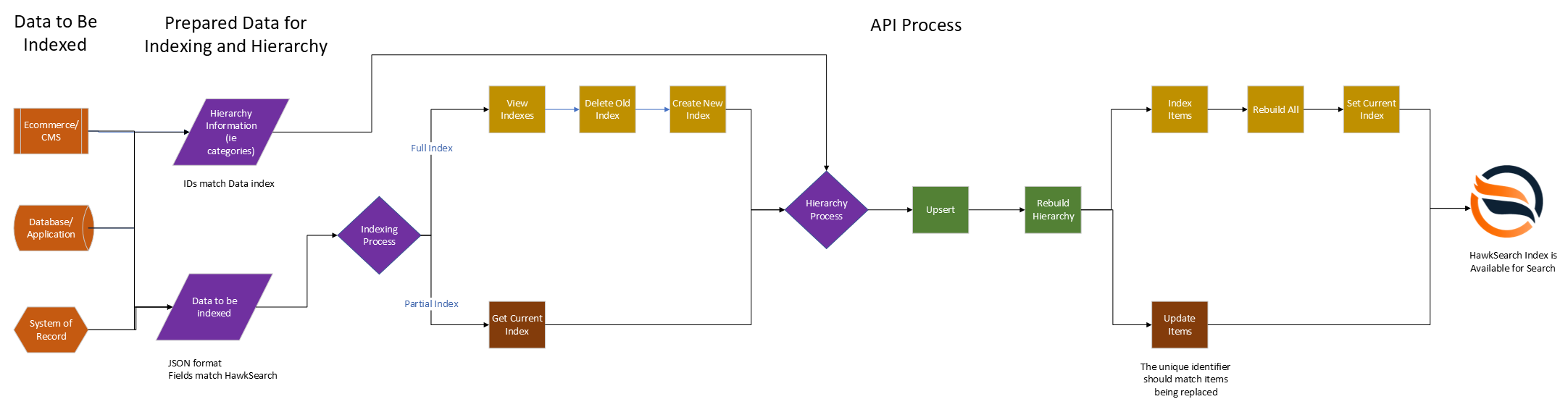
Domains
Hawksearch has three environments available: Development, Test and a load-balanced Production. When using the search API methods in this document, the following domains can be used to access each environment after your engine has been set-up in that environment.
Before You Begin
Please ensure that your client-specific endpoints are configured before implementing any API integrations. Please refer to this article to learn more about client-specific endpoints and reach out to our CSD team for any questions.
Development
client-specific URL: https://enginename.dev.index-na.hawksearch.com
Configurations for an engine in this location are maintained in the HawkSearch Workbench at dev.hawksearch.net.
Test
client-specific URL: https://enginename.test.index-na.hawksearch.com
Configurations for an engine in this location are maintained in the HawkSearch Workbench at test.hawksearch.net.
Production
client-specific URL: https://enginename.index-na.hawksearch.com
Configurations for an engine in this location are maintained in the Hawksearch Workbench at dashboard-na.hawksearch.com.
Hierarchy API Methods
Upsert
The Upsert method is used to insert Hierarchy objects. There is a limit of 125 Hierarchy objects that can be sent in a request. This method can be called multiple times to accommodate more than 125. After all Hierarchy objects have been sent, the Rebuild Hierarchy endpoint must be used.
Request
| Endpoint | Method | Header Key |
|---|---|---|
| api/hierarchy/upsert | POST | Content-Type: application/json |
Parameters
| Name | Data Type | Required | Description |
|---|---|---|---|
| IndexName | string | required | Name of the index in which the hierarchy is being built |
| Hierarchies | Array of Hierarchy objects | required | See Hierarchy Object section. |
Rebuild
Updates Hierachy information in the given index to reflect any changes made.
Request
| Endpoint | Method | Header Key |
|---|---|---|
| api/hierarchy/rebuild | POST | Content-Type: application/json |
Parameters
| Name | Data Type | Required | Description |
|---|---|---|---|
| IndexName | string | required | Name of the index in which the hierarchy is being built |
Delete All
Deletes all Hierarchy objects from the database.
Request
| Endpoint | Method | Header Key |
|---|---|---|
| api/hierarchy/delete-all | POST | Content-Type: application/json |
Parameters
| Name | Data Type | Required | Description |
|---|---|---|---|
| IndexName | string | required | Name of the index in which the hierarchy is being deleted |
Delete Items
Deletes the hierarchy matching the given HierarchyId(s). If a hierarchy containing other hierarchies is deleted, all hierarchies contained within the deleted hierarchy are deleted as well. Product data is not affected by this endpoint.
Request
| Endpoint | Method | Header Key |
|---|---|---|
| api/hierarchy/delete-items | POST | Content-Type: application/json |
Parameters
| Name | Data Type | Required | Description |
|---|---|---|---|
| IndexName | string | required | Name of the index in which the hierarchy item is being deleted |
| Ids | Array of strings | required | The HierarchyId of the hierarchy to be deleted. |
Retrieve Hierarchy
Lists all hierarchies stored within the system.
Request
| Endpoint | Method | Header Key |
|---|---|---|
| api/hierarchy/ | POST | Content-Type: application/json |
Parameters
| Name | Data Type | Required | Description |
|---|---|---|---|
| IndexName | string | required | Name of the index from which to retrieve hierarchy |
Response
| Object | Data Type | Description |
|---|---|---|
| Mapping | Array of strings | The object encapsulating the mapping information |
| > Field | String | Field name used in the hierarchy |
| > Path | String | A slash-separated value indicating the nested hierarchy |
| > Code | String | SEO friendly code for the hierarchy |
| > Label | String | Display label of the hierarchy |
| Field | String | Field name used in the hierarchy |
| Value | String | Facet value |
| Url | String | Url of the page representing the hierarchy (optional) |
| ImageUrl | String | Url of the image representing the hierarchy (optional) |
Hierarchy Object
Hierarchy Objects are how hierarchy data is sent into HawkSearch.
| Object | Data Type | Always | Description |
|---|---|---|---|
| HierarchyId | String | Yes | Unique identifier for the hierarchy entry |
| Name | String | Yes | Display name for the hierarchy entry |
| ParentHierarchyId | String | Yes | The HierarchyId of the parent hierarchy for this hierarchy entry. If this hierarchy entry is a top-level, the value passed should be "0". |
| IsActive | Boolean | No | Indicates if the hierarchy entry is active and should be displayed. It is not required to send inactive hierarchies, but some product systems generate them for sending. |
| SortOrder | Number | No | Integer to use for sorting the hierarchy entries for display |
| Custom | String | No | Placeholder for custom implementation use |
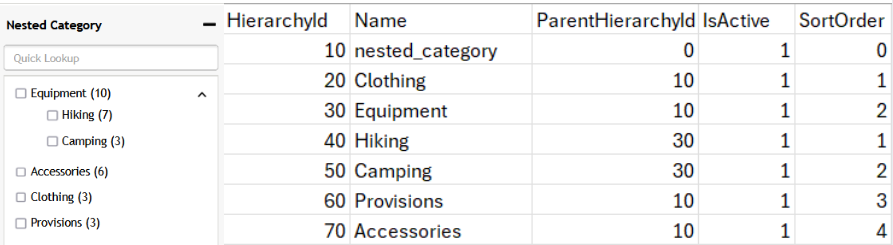
In the example below, the left image shows how the hierarchies represented on the right are displayed. Each hierarchy is either the parent hierarchy (Nested Category), underneath the parent category (Equipment, Accessories, Clothing, and Provisions), or a sub-category of one of the former (Hiking, Camping). These relationships are defined by the ParentHierarchyId associated with each hierarchy.
Hierarchy API Examples
Following operations are provided by Hawksearch hierarchy API:
- Upsert to add new or update existing hierarchies.
- RebuildMapping to initiate hierarchy mapping.
- DeleteHierarchyItems to remove either multiple or a single hierarchy object.
- DeleteAllHierarchyItems to remove all hierarchy objects.
General Notes:
- Ensure that the header contains the Hawksearch Key for all the operations:
Request headers must contain the Hawksearch API Key as follows:
Format: X-HawkSearch-ApiKey : {your engine API key}
Example: X-HawkSearch-ApiKey : 12345678-9ABC-DEF0-1234-56789ABCDEF0 - Hierarchy addition is a 3-step process with hierarchy upsert, hierarchy rebuild and index items operations.
A. Following steps are required to successfully add hierarchies to the engine
Some highly important notes to know before you add the hierarchies
- If you intend to perform a full hierarchy update, please delete the existing hierarchies as mentioned in the section C below before inserting new hierarchies.
- The name of the topmost hierarchy must be lower case and have no spaces or special symbols except for underscores. All other Hierarchy names under this do not have any naming restrictions. Usually, the topmost hierarchy name (without spaces) is category. The field name in the below example is
categoryso there needs to be a field created by this name in the dashboard, other hierarchies do not need fields. - The difference in naming is that the names of other hierarchies are common names example Outdoor Kitchens or As Seen On TV, but the name of the topmost hierarchy must be the fieldname example products, category, department_name etc - please see Field Configuration: Naming Convention
- The parent hierarchy id for the top-most hierarchy must be 0. The top-most hierarchy, as well as all other hierarchies, should be given a unique Hierarchy ID.
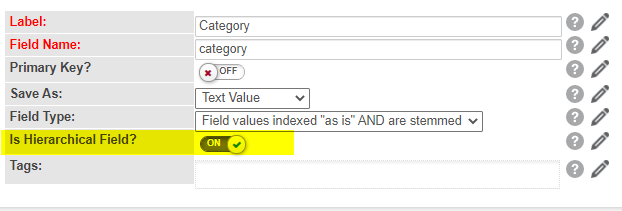
- The field created for category must be marked as hierarchical on the dashboard:
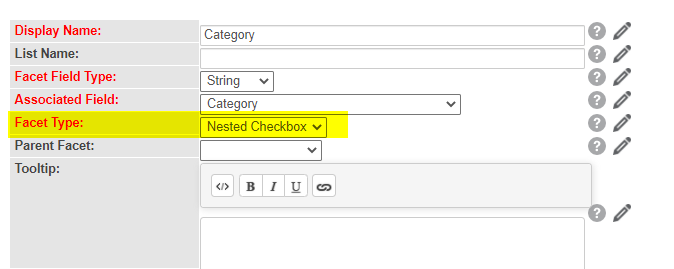
- A facet must be created for this field which is either a nested checkbox or nested list:
Step 1: Upsert the hierarchies in a POST request
{
    "IndexName": "demo.20200101.123456",
    "Hierarchies": [
        {
            "HierarchyId": "1234",
            "Name": "category",
            "ParentHierarchyId": "0",
            "IsActive": true,
            "SortOrder": 0,
            "Custom": ""
        },
        {
            "HierarchyId": "1111",
            "Name": "Clothing",
            "ParentHierarchyId": "1234",
            "IsActive": true,
            "SortOrder": 0,
            "Custom": ""
        },
        {
            "HierarchyId": "2222",
            "Name": "Accessories",
            "ParentHierarchyId": "1234",
            "IsActive": true,
            "SortOrder": 1,
            "Custom": ""
        },
        {
            "HierarchyId": "3333",
            "Name": "Footwear",
            "ParentHierarchyId": "1234",
            "IsActive": true,
            "SortOrder": 1,
            "Custom": ""
        },
        {
            "HierarchyId": "1212",
            "Name": "Jackets",
            "ParentHierarchyId": "1111",
            "IsActive": true,
            "SortOrder": 1,
            "Custom": ""
        },
        {
            "HierarchyId": "3434",
            "Name": "Shirts",
            "ParentHierarchyId": "1111",
            "IsActive": true,
            "SortOrder": 1,
            "Custom": ""
        }
    ]
}
Step 2: Map and configure the hierarchies added in Step 1
{
	"IndexName": "demo.20200101.123456"
}
B. Below API request lists the hierarchies
{
	"IndexName": "demo.20200101.123456"
}
C. Following are the options to remove hierarchies from the engine:
(Please rebuild hierarchy before and after deleting hierarchies)
Option 1: Delete certain hierarchies
Note that deleting a parent hierarchy will delete all other hierarchies under it
Delete items from hierarchy API
{
	"IndexName": "demo.20200101.123456",
	"Ids" : [
		"1234","5678","1212","3434"
	]
}
Option 2: Delete all hierarchies
Delete all hierarchy items API
{
	"IndexName": "demo.20200101.123456"
}
D. Associate Items with one or more hierarchies
Since the hierarchies and the actual data items are indexed separately, we need to associate the items with the hierarchies. This can be established through normal indexing API.
Note
- The index-items request must contain the hierarchy ids as the value of the topmost category and must not be the name.
- The hierarchies need to be split into multiple requests if they exceed the limit of 125 hierarchies in a request, splitting will not be necessary for hierarchies within this limit.
- Please upsert the hierarchies, rebuild the hierarchies and then index all the items to ensure a seamless indexing activity.
If we have Clothing (1111) → Accessories (2222) → Jackets (1212) as one of the hierarchies, then the index-items request will be as follows:
The facet created out of the category field will be hierarchical.
{
"IndexName": "demo.20200101.123456",
"Items":
    \[
        {
            "name": [
                "Demo item1"
            ],
            "id": [
                "Test001"
            ],
            "brand": [
                "Test brand item"
            ],
            "category": [
                "1111","2222","1212"
            ]
        }
    ]
}
For details on the indexing API visit - Hawksearch - v4.0 - Indexing API
Updated 3 months ago