

Connector Configuration
Shopify Connector Overview
The Shopify Connector provides the integration layer between a Shopify storefront and HawkSearch. It is responsible for synchronizing catalog data, configuring field mappings, indexing products, tracking shopper behavior, and exposing HawkSearch functionality throughout the storefront experience.
The connector includes built-in administration screens for managing connectivity, indexing, tracking, recommendation widgets, and field mappings directly from the Shopify admin.
Supported Features
The connector supports the following HawkSearch capabilities:
| Features | Notes |
|---|---|
| Search | All features for Boost/Bury, Pinning, Synonyms, Redirects, Spelling override, and Keyword replacement |
| Did You Mean | All features supported |
| Unit of Measure | All features supported |
| Advanced SKU Search | All features supported |
| Autocomplete | All features supported |
| Instant Engage | All features supported |
| Facets | All features supported. Creation of facets are done within HawkSearch. |
| Sorting | All features supported |
| Campaigns | All features supported |
| Landing Pages | All features supported |
| Recommendations | All features supported |
The following features need additional front end changes in order to be implemented:
| Feature | Notes |
|---|---|
| Visitor Target / Personas | Supported through small front end template changes. |
| Hawk AI | Smart Search and Smart Response available through basic front end template changes. |
Connector Navigation
The connector is organized into the following sections:
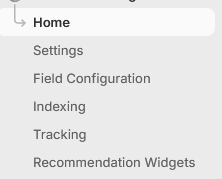
Each section is designed to manage a specific area of the HawkSearch integration.
Connector Features
Home
The Home page is the connector's landing page. It shows the state of your HawkSearch integration at a glance.
[Screenshot: the app's home page, retaken on the current version]
- Getting Started lists the steps to finish setting up: Field Configuration, the first indexing run, and turning on HawkSearch in your theme. Click Don't show again to hide it.
- HawkSearch connectivity shows whether the app can reach your engine, and whether the API key and Client GUID are valid. It's checked each time the page loads.
- Your plan shows your HawkSearch plan, when a free trial ends, and a Change plan link. See Plans and Billing.
- Integration Status shows when your catalog was last indexed, the number of products in HawkSearch and in Shopify, and whether real-time updates (webhooks) are active.
Products in HawkSearch vs. products in ShopifyThe number of products in HawkSearch is usually lower than the number in Shopify. Only products your shoppers can see are indexed (see Which products are indexed), and on the Starter plan at most 1,000.
Settings
The Settings page establishes the connection between Shopify and HawkSearch.
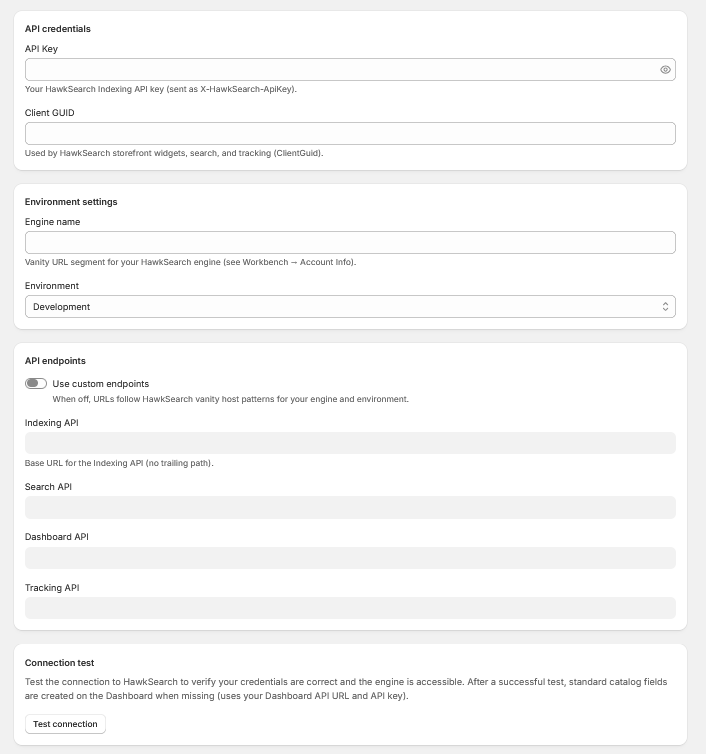
API Credentials
Used to authenticate the connector with HawkSearch. These are added automatically when your HawkSearch engine is created during installation.
Environment Settings
Defines the HawkSearch environment and engine that will receive catalog data from Shopify.
API Endpoints (Default)
Allows the connector to communicate with standard HawkSearch services using default endpoint URLs.
API Endpoints (Vanity)
Supports custom customer-specific endpoint URLs supplied by HawkSearch.
Connection Test
Sends a validation request to verify that credentials, endpoints, and engine configuration are correct.
Testing RecommendationAfter changing any settings, run the Connection Test to confirm connectivity before proceeding with field synchronization or indexing.
Field Configuration
Field Configuration controls which Shopify product fields are synchronized to HawkSearch.
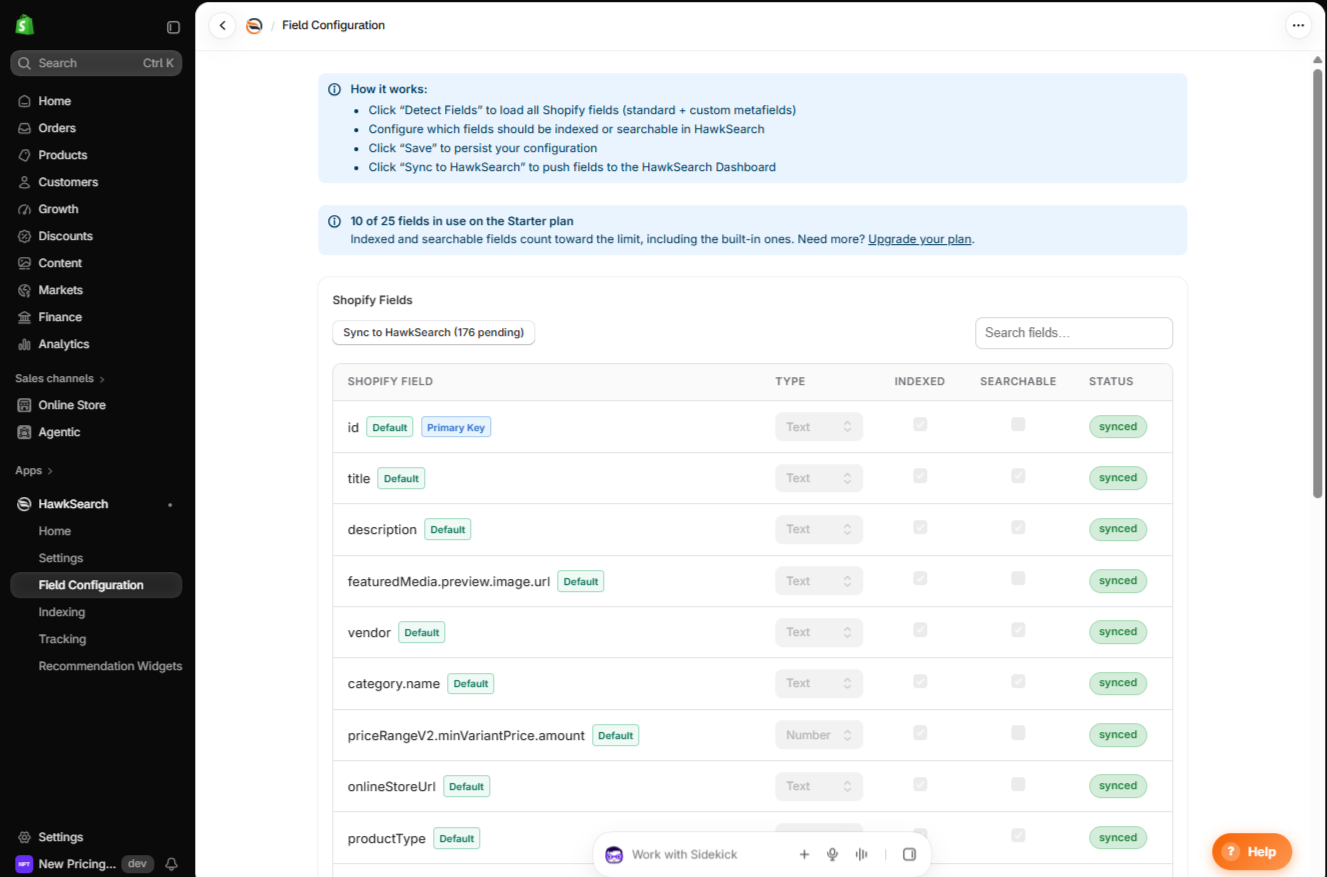
Administrators can select which product fields should be sent to HawkSearch and determine how those fields are used within the index.
| Feature | Notes |
|---|---|
| Type | Supported field types include Text, Number, Boolean, and Date. |
| Indexed | Determines whether a field is included in the HawkSearch index. |
| Searchable | Controls whether a field participates in search queries. |
| Status | Displays synchronization status between Shopify and HawkSearch. |
On first setup, click Detect Fields to load your Shopify product fields, choose your fields, and click Save. After that, use Sync to HawkSearch to create or update the fields in HawkSearch whenever you change them. New Shopify fields, such as new metafields, are detected automatically when you open the page.
Default Fields
New installations start with ten built-in fields: ID, title, description, image, vendor, category, price, product URL, product type and collections. Title, description, vendor, category and product type are searchable.
Title, vendor, product type and category also match partial words, so a search for board finds snowboard. Vendor, product type and category can also be used as facets.
Field Limit on the Starter Plan
On the Starter plan, up to 25 fields can be indexed or searchable, including the built-in fields. A banner above the field list shows how many are in use. If a change would go over 25, the Save and Sync to HawkSearch buttons are disabled until you turn some fields off, or you can upgrade your plan.
Facet ManagementFacets are configured inside HawkSearch rather than Shopify. After creating or modifying facets, a short delay may occur before updates become visible on the storefront due to caching.
Indexing
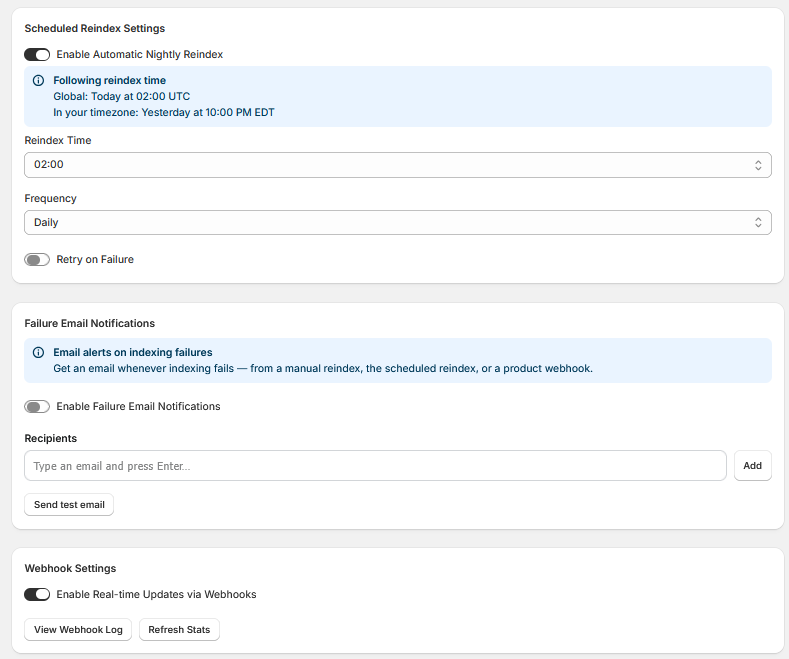
The Indexing section manages product synchronization between Shopify and HawkSearch.
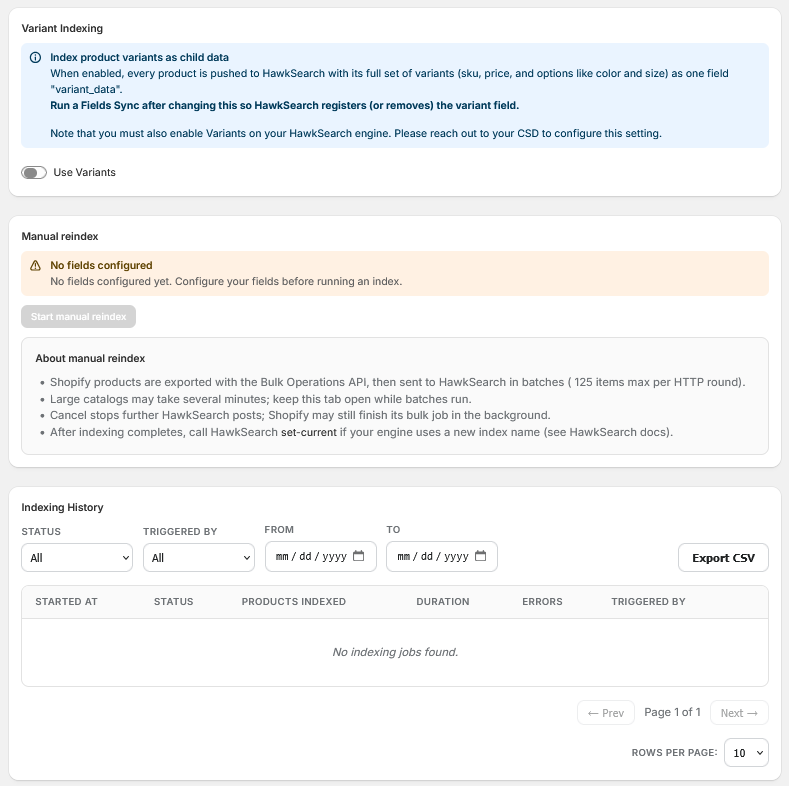
Indexing ImpactFull reindex operations do not interrupt search functionality. HawkSearch builds a new index and promotes it once indexing is complete.
Which Products Are Indexed
Only products your shoppers can see are sent to HawkSearch:
- the product's status is Active,
- it's published to the Online Store sales channel,
- it isn't a gift card.
Draft and archived products are left out. When a product is set to Draft, archived or unpublished, real-time updates remove it from HawkSearch straight away.
On the Starter plan, indexing stops at 1,000 products. The Indexing page and the home page then show a banner with the number indexed and a link to upgrade.
Scheduled Reindex Settings
Scheduled reindexing allows administrators to automate full catalog synchronizations. Stores with frequent catalog changes should schedule reindexing appropriately to ensure search data remains current.
With Enable Automatic Nightly Reindex enabled, your HawkSearch Engine will automatically reindex upon the specified Reindex Time and Frequency. Note: All times are in UTC. With Retry on Failure Enabled, HawkSearch will automatically retry a failed reindex every 5 minutes within the daily scheduled window (default 59 minutes, up to ~11 attempts). Once the window closes, no further retries will occur until the next scheduled day.
Failure Email Notifications
Enable Failure Email Notifications toggles alert emails whenever indexing of any kind fails. Alerts are sent to every email listed within the Recipients box. To confirm that emails are being sent properly, the Send Test Email button will send a test email to all listed recipients.
Webhook Settings
Webhooks provide near real-time updates from Shopify to HawkSearch. When a product is modified in Shopify, the connector can automatically submit a partial index update so that only the affected item is refreshed. Webhooks are enabled by pressing the Enable Real-time Updates via Webhooks switch.
Additionally, a log of all webhook actions can be found by pressing the View Webhook Log button.
Variant Indexing
Variant Indexing allows for Variants to be indexed within your Shopify storefront. Variants are a way to represent multiple versions of the same product that share common product information but differ in other fields such as color and price. More information about Variants can be found here.
When enabled, Shopify sends each product to HawkSearch along with all of its variants, such as different sizes, colors, SKUs, and prices. This allows HawkSearch to use variant information when indexing and displaying products.
Important: After turning this setting on or off, run a Fields Sync so HawkSearch can add or remove the variant data field.
Note: Variants have to first be enabled by your CSD within your HawkSearch engine.
On the Starter plan, variant data counts as one field toward the 25-field limit. If you're already using 25 fields, turning on variant indexing is refused until you turn another field off.
Manual Reindex
Manual reindexing allows administrators to initiate a full synchronization outside of the normal indexing schedule. Click Start manual reindex. This is commonly used after large catalog updates, schema changes, or initial implementation. Depending on the size of your catalog, this may take several minutes.
Indexing History
The connector maintains a record of indexing activity. Here, you'll be able to view the record and information regarding previous indexes. Each index record has information regarding the time it was initiated, whether it was initiated manually or automatically, the duration, the status of the operation, and the number of products indexed out of the products found. On the top bar, you can filter the indexing history by status, trigger, or a date range.
Indexing history can also be exported to CSV for additional analysis and troubleshooting.
Tracking
Tracking captures shopper interactions and sends behavioral data to HawkSearch. This data powers analytics, reporting, recommendations, and personalization functionality.
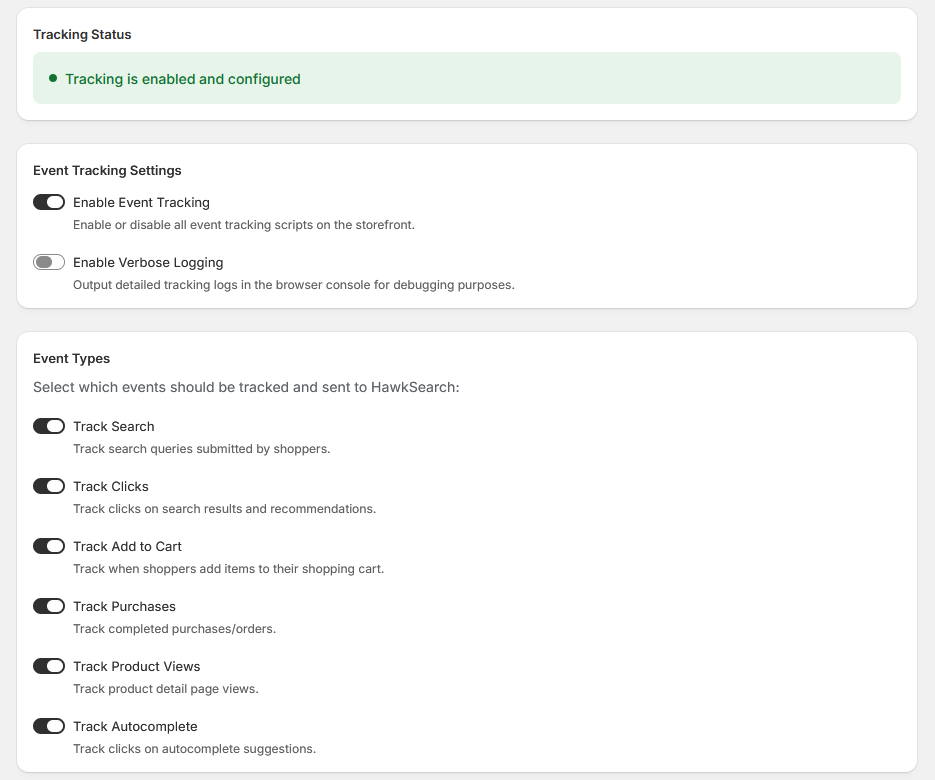
Tracking Status
The Tracking Status shows a quick summary regarding the functionality of tracking within your Shopify storefront. You can disable Event Tracking by toggling the Enable Event Tracking switch off. When this is turned off, Tracking Status will display a gray circle with text reading Tracking is disabled.
Verbose Logging can be enabled through Enable Verbose Logging. Verbose Logging will output detailed tracking logs in the browser console, and is primarily used for debugging purposes.
Event Types
The following chart details the events tracked within HawkSearch. More information about Event Tracking can be found through the following link: Event Tracking API
| Event Name | Description |
|---|---|
| Search | Track search queries submitted by shoppers. |
| Clicks | Track clicks on search results and recommendations. |
| Add to Cart | Track when shoppers add items to their shopping cart. |
| Purchases | Track completed purchases/orders. |
| Product Views | Track product detail page views. |
| Autocomplete | Track clicks on autocomplete suggestions. |
Recommendation Widgets
The Recommendation Widgets section controls storefront recommendation functionality.
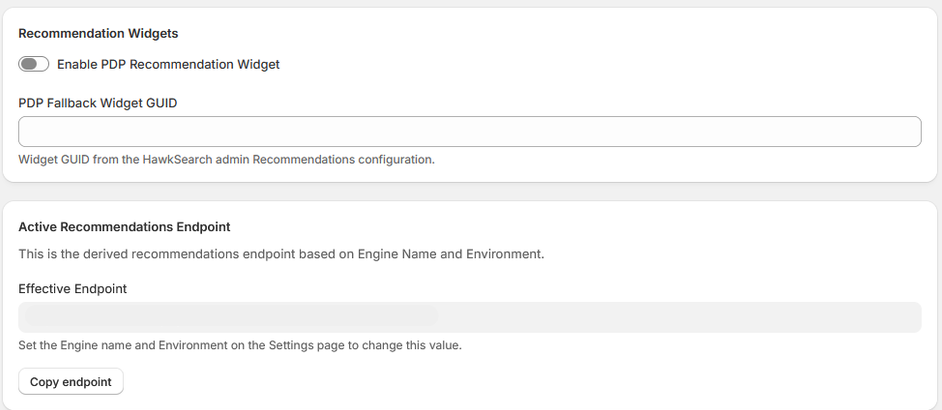
Recommendation Widgets
This section dictates whether HawkSearch product recommendations are displayed on product detail pages. Recommended products can be shown based on shopper behavior, popular items, frequently purchased products, or other recommendation strategies configured in HawkSearch.
This behavior is toggled via the Enable PDP Recommendation Widget switch.
The PDP Fallback Widget GUID is the GUID of a HawkSearch recommendation widget that will be used when the primary PDP recommendation widget cannot return results. This is found within the HawkSearch Recommendations configuration.
Landing Pages & Collections
Collections are an important feature in Shopify that allow an Administrator to group a number of products together to make a "collection." These collections map well to HawkSearch Landing Pages. However, there are advantages to HawkSearch landing pages that can extend the features of Collections such as:
- Facet control such as hiding and ordering facets
- Filtering out specific products
- Analytics tracking
The connector does not require the Shopify Admin to recreate all of the landing pages in HawkSearch - this will happen automatically. These landing pages are not required to be used - but they are available for inclusion if desired. These landing pages can be added to your site using Rapid UI or through API integration.
Updated 1 day ago