

Installation
Important:
You'll need a HawkSearch engine before you proceed. For more information regarding creating a HawkSearch engine, check out our QuickStart guide.
Introduction
This guide walks through the installation of the HawkSearch Shopify application and the configuration required to enable HawkSearch functionality within your storefront theme.
The installation process consists of two steps:
- Installing the HawkSearch application from the Shopify App Store.
- Enabling the HawkSearch App Embed within your active theme.
Install the HawkSearch Application
Within your Shopify dashboard, navigate to the Apps sidebar. Underneath the header, click on the Add button.

A pop up with suggested add ons will appear. There, you'll see the following link near the bottom:

Click the link to be taken to the Shopify App Store. Once there, search for HawkSearch and press Install.
When installation is complete, HawkSearch will appear in your list of installed Shopify applications.
Inputting Your Engine Information
Upon the successful creation of a HawkSearch engine, information such as your HawkSearch API key and Client GUID will be automatically saved within your Shopify connector. This process happens immediately after set-up, and takes approximately five minutes. While this is happening, your Shopify connector will display a message about your HawkSearch engine being set up.
Once successful, your Shopify connector will be automatically connected with your HawkSearch engine.
Theme Integration
After installing the application, HawkSearch must be enabled within your storefront theme before its functionality becomes available to shoppers.
From your Shopify Admin dashboard:
- Navigate to Online Store > Themes.
- Locate your active theme.
- Click Customize to open the Theme Editor.
Within the Theme Editor, select App Embeds using the icon located next to the theme settings menu.
Scroll through the list of available app embeds until you locate the HawkSearch embed.
:
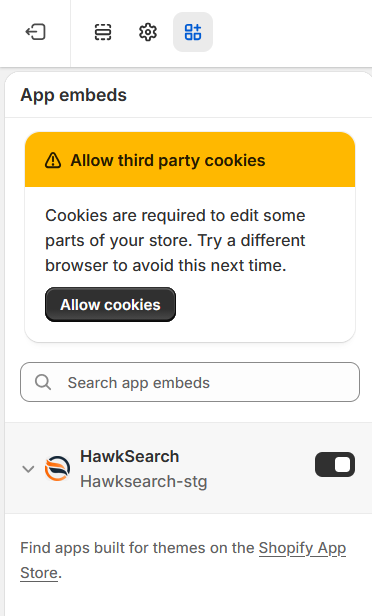
Click on the radio switch to enable.
Verify the Installation
To confirm that HawkSearch has been successfully enabled:
- Open your storefront.
- Navigate to a page where HawkSearch functionality is expected to appear.
- Verify that HawkSearch components are visible and functioning as expected.
If HawkSearch functionality does not appear, confirm that:
- The HawkSearch application is installed.
- The App Embed is enabled in the active theme.
- Theme changes have been saved.
Next Steps
Once installation is complete, continue to the configuration guides to connect your Shopify store to your HawkSearch engine and configure search behavior.
Updated 25 days ago